
The hyperautomation vs. point automation tools decision turns on scope. Point tools win on upfront cost and speed to a first result, while hyperautomation wins once work crosses several systems and needs AI judgment. Process fragmentation should settle it.
Enterprise software stacks now grow faster than teams can connect them. MuleSoft’s 2025 Connectivity Benchmark found the average organization runs 897 applications, yet only 2% have integrated more than half of them. That gap explains why the hyperautomation vs. point automation tools question now sits with operations leaders, not just IT. Point automation tools are single-purpose products that automate one task or handoff inside one or two applications.
Hyperautomation is an enterprise-wide discipline that combines RPA, AI, process mining, and integration to automate complete processes. The call is harder than vendors admit, since a well-chosen point tool often pays back within weeks. The criteria below show where each approach earns its place, and how AI workflow automation shifts the math.
What Seven Criteria Should Guide Your Hyperautomation Decision
Seven criteria settle most hyperautomation vs. point automation tool decisions, and the sections that follow return to each one:
- Scope of automated work: a single task compared with an end-to-end process.
- Upfront cost: license and setup spend before the first measurable result.
- Time to first value: how many weeks pass before real hours are saved.
- Cross-system integration: how many applications one workflow can coordinate.
- AI-driven decisions: fixed rules only, or judgment on unstructured inputs.
- Governance and compliance: audit trails, access control, and one policy layer.
- In-house skill required: who can build, change, and maintain the automation.
| Criterion | Point Automation Tools | Hyperautomation | Verdict |
|---|---|---|---|
| Scope of automated work | One task or handoff | Complete cross-functional processes | Broader scope: hyperautomation |
| Upfront cost | Low, often per seat | Higher platform and design spend | Lower upfront cost: point tools |
| Time to first value | Days to a few weeks | Months for the first full process | Faster first result: point tools |
| Cross-system integration | Two or three apps | Many systems, one orchestration layer | Wider reach: hyperautomation |
| AI-driven decisions | Mostly fixed rules | Models handle documents and exceptions | Stronger judgment: hyperautomation |
| Governance and compliance | Scattered across vendors | Central logging and access control | Easier audits: hyperautomation |
| In-house skill required | Business users can own it | Needs architects or a partner | Lighter skill load: point tools |
What Is AI Automation and Where Point Automation Tools Fit Today
What is AI automation? It is the use of machine learning and language models to finish work that fixed rules cannot handle, such as reading a scanned invoice or routing an email by intent. Usage is already broad. McKinsey’s State of AI 2025 survey found 88% of organizations use AI in at least one function, yet nearly two-thirds have not begun scaling it across the enterprise.
Defining Artificial Intelligence and Automation in the Enterprise
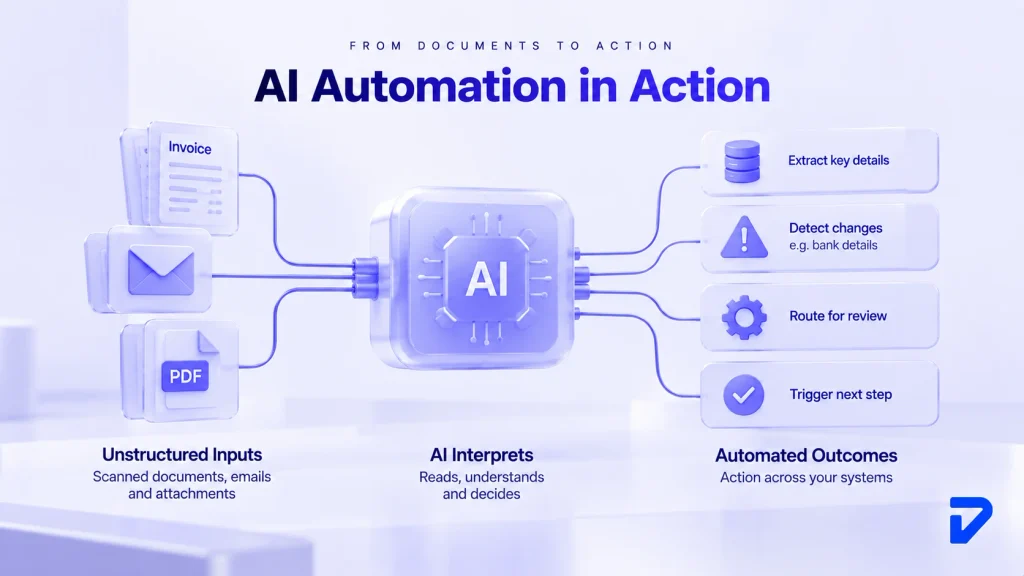
Automation executes instructions, while artificial intelligence interprets situations. Artificial intelligence and automation meet in the enterprise when one system both acts and decides. A classic bot copies a purchase order number from an email into SAP exactly as scripted. Add a language model, and the same flow can read a scanned PDF, notice that the vendor changed its bank details, and hold the payment for review. That pairing, rather than either half on its own, is what most buyers are paying for in 2026.
Common Point Automation Tools Used Across Departments
Most departments already run several point tools without calling them that. Sales and marketing teams push form fills into the CRM through Zapier, finance routes invoice approvals in Bill.com, HR books interviews with Calendly, and IT resets passwords through a ServiceNow catalog item. A typical point automation fits in a few lines of configuration:
trigger: hubspot.new_form_submission
action: salesforce.create_lead
filter: country == “US”
Each one works well inside its own boundary and rarely beyond it.
Where Point Automation Tools Fall Short at Scale
Trouble starts when a process spans the boundaries between tools. Deloitte’s intelligent automation research observed that firms starting with one or two tools, such as OCR and RPA, soon hit the limits of that approach. Its most advanced adopters moved from task-based toward end-to-end automation. Each tool automates a slice, so handoffs stay manual, exceptions fall into inboxes, and nobody owns the full result.
What Is Hyperautomation and How It Extends Business Process Automation
Hyperautomation is business process automation with a wider lens and a larger toolkit. Gartner frames it as a business-driven discipline for identifying, vetting, and automating as many business and IT processes as possible. Where classic BPM software digitizes one workflow at a time, hyperautomation connects many workflows, measures them continuously, and keeps redesigning the slowest steps.
Core Technologies Behind Hyperautomation: RPA, AI, and ML
A working hyperautomation stack usually has five layers. Process mining tools such as Celonis reveal how work actually flows through the business. RPA bots from vendors like UiPath or Microsoft Power Automate handle clicks inside legacy screens that lack APIs. Machine learning models classify, extract, and predict. An integration platform, for example MuleSoft or Workato, moves data through APIs, and an orchestration layer sequences every step and routes exceptions to the right person.
How Intelligent Process Automation Differs From Task-Level Automation
Task-level automation speeds up a single step, whereas intelligent process automation redesigns a chain of steps around AI judgment, so the workflow can read, classify, and decide as it runs. Finance shows the shift clearly. Gartner’s 2024 finance AI survey found intelligent process automation was the leading use case, used by 44% of finance functions, ahead of anomaly and error detection.
What Is the Difference Between Hyperautomation and Point Automation Tools
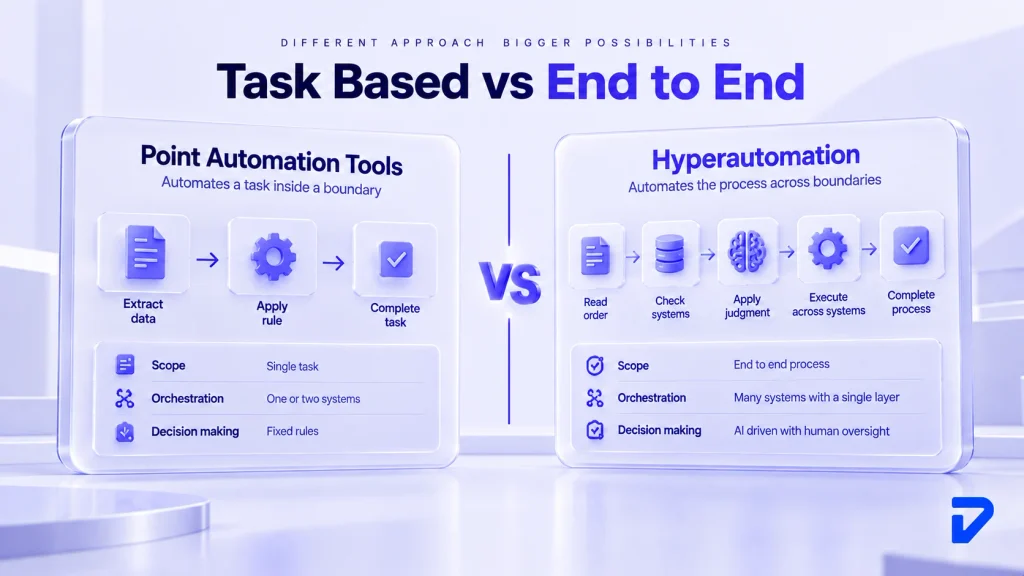
What is the difference between hyperautomation and point automation tools? Point tools automate a task inside a boundary, whereas hyperautomation automates the process across boundaries, with AI handling judgment and a single layer governing every step. The three contrasts below, covering scope, orchestration, and decision-making, account for most of the practical gap buyers notice after deployment.
Scope and Complexity of Automated Workflows
Consider order-to-cash at an industrial distributor. A point tool can extract line items from an emailed purchase order. A hyperautomated flow takes that same order, checks credit in the ERP, confirms stock in the warehouse system, applies contract pricing, books the sale, and flags any margin exception to a rep. The first approach trims minutes per order, while the second removes the queue entirely, because no one carries data between steps.
Integration and Orchestration Across Systems
Integration moves data between systems, and orchestration decides what happens next and in what order. When that logic lives in one layer, an approval rule changes once instead of in four separate tools. A simplified process definition shows the idea:
process: order_to_cash
steps: [extract_po, credit_check, stock_check, apply_pricing, book_order]
on_exception: route_to_human(queue: “sales-ops”)
Scoping this layer is usually the first job for our AI integration services team.
Decision Making and AI-Driven Automation Capabilities
Point tools follow fixed rules, such as escalating any invoice above $5,000. An AI-driven flow reads the invoice, notices the order references a discontinued part, checks the approved substitute’s price, and proposes a fix with its reasoning attached. That is the territory of agentic AI services, where agents plan multi-step actions inside guardrails and people approve anything above a defined risk threshold.
Why Companies Are Consolidating Point Automation Tools
The Hidden Cost of Tool Sprawl in Enterprise AI Automation
Every point tool adds a license, a login, a copy of customer data, and another vendor security review. The quieter cost is ungoverned AI. IBM’s 2025 Cost of a Data Breach findings show one in five organizations suffered a breach tied to shadow AI, and only 37% have policies to manage or detect it. Sprawl hides that exposure, since each team’s enterprise AI experiments live in a separate console.
How Disconnected Tools Undermine Automation ROI
Picture a finance team that automated invoice capture, then approvals, then payments, each with a different product. Capture might save ten minutes per invoice, but exceptions still land in a shared inbox, approvers still chase context by email, and reconciliation still happens in spreadsheets. The team pays three subscriptions for partial gains at every stage. Automation ROI stalls because the bottleneck simply moves to the handoffs between tools.
The Shift Toward Unified Intelligent Automation Services
Buyers are moving budgets from individual products to intelligent automation services that design, build, and run whole processes. Gartner saw this coming, noting that organizations were shifting from loosely coupled automation tools to a more connected strategy. It also predicted that firms pairing hyperautomation with redesigned processes would lower operating costs by 30% by 2024. Vendors responded by packaging RPA, low-code, and process management together.
Is Hyperautomation Better Than Point Automation Tools for Enterprise Use
Is hyperautomation better than point automation tools for enterprise use? For cross-functional processes with high volume and frequent exceptions, it usually is. For contained tasks, a point tool often delivers a faster and cheaper win, and replacing it would waste money. The right answer depends on the process in question rather than on the size of the company running it.
Where Point Automation Tools Still Make Sense
Point tools stay the right choice when a task is stable, limited to one or two apps, and owned by a single team. Calendly booking demos onto a rep’s calendar, DocuSign routing a standard NDA, or a Power Automate flow filing attachments into SharePoint all qualify. A rebuild of any of these on an enterprise platform adds cost without adding value, so the smarter move is to keep them, inventory them, and govern them.
Where Hyperautomation Delivers Stronger Enterprise AI Outcomes
The gains grow when AI and automation work on the same process instead of in parallel tools. Deloitte’s Automation with Intelligence study found organizations that combine RPA with AI report an average revenue increase of 9%, compared with 3% for those that keep the two apart. Enterprises also gain one audit trail, shared data, and a single place to monitor how models behave.
When Should You Choose Hyperautomation Over Point Automation Tools
When should you choose hyperautomation over point automation tools? Choose it when a process touches three or more systems, runs at high volume, and generates exceptions that people now resolve by hand. Stay with point tools when the task is contained, and its owner can maintain it without IT support. The signals below make that call concrete.
Signals Your Business Needs AI Workflow Automation at Scale
Several patterns point toward AI workflow automation at scale. Staff re-key the same customer data into the ERP, CRM, and ticketing system every day. Exception queues grow faster than headcount. Audit requests take days because the evidence sits in six different tools. Leaders cannot see cycle time from order to cash, and when one customer order passes through five automations that share no state, the process has outgrown point tools.
Signals Point Automation Tools Are Still Sufficient
Point tools remain enough when volume is modest, and the work rarely leaves its home application. A rough rule of thumb, worth adjusting to your own cost data, looks like this:
systems_touched <= 2
monthly_volume < 500 transactions
exception_rate < 5%
process_owner = one team
result = keep the point tool
If all four conditions hold, spend the budget elsewhere and revisit the decision once a year.
Not sure which of your processes have outgrown their point tools?
Pinnasys maps your workflows, then builds and runs the path that fits, whether targeted tools or full orchestration, around your systems and compliance needs.
Hyperautomation vs Point Automation Tools for Mid-Market Companies
Hyperautomation vs point automation tools for mid-market companies is mostly a question of sequencing, because budgets and teams are thinner than in large enterprises. The logic of consolidation still applies, but the path has to fund itself in stages, with each phase proving its savings before the next one starts.
Budget and Resource Realities for Mid-Market AI Automation
A $150 million manufacturer rarely has an automation center of excellence; it has an IT director, two analysts, and SaaS contracts renewed department by department. Demand is real anyway, since the U.S. Census Bureau reports that 32% of firms with 100 to 249 employees used AI in spring 2026. That makes mid-market AI spending lumpy. A split into discovery, build, and run costs, as our AI automation cost guide explains, keeps the business case honest.
How Hyperautomation as a Service Lowers the Entry Barrier
Hyperautomation as a service replaces a platform purchase with a contracted outcome. A partner such as Pinnasys designs the orchestration, connects the ERP and CRM, applies AI for automation of document-heavy steps, and runs the system for a monthly fee. The company pays for processes working in production rather than for idle licenses, and it can bring operations in-house later, once internal skills catch up.
Which Do You Actually Need: Hyperautomation or Point Automation Tools
Which do I actually need, hyperautomation or point automation tools? Most companies need both, in sequence, and a short self-assessment shows where to draw the line. Answer five questions honestly: How many systems does the process touch? Does your team include anyone who can maintain integrations? Is budget easier to find as upfront capital or as a monthly operating cost? How heavy is your compliance load, for instance, SOX or HIPAA? And how soon must savings appear on the P&L?
Choose point automation tools if:
- The task lives inside one or two applications and rarely changes.
- One team owns the process and can maintain the tool without IT.
- You need a measurable win this quarter with minimal upfront spend.
- Compliance evidence for the task is simple to capture in one place.
Choose hyperautomation if:
- The process crosses three or more systems and several departments.
- Exceptions consume a growing share of staff time each month.
- Auditors need one trail that covers every automated decision.
- You plan to deploy AI agents that need governed access to many systems.
A genuine hybrid exists: keep stable point tools, and let an orchestration layer call them as steps inside larger processes.
A Simple Framework for Evaluating Your Automation Maturity
Maturity is easier to judge against a scale than against a vendor pitch. Place each major process, not the whole company, on the level that describes it today:
| Level | What It Looks Like | Typical Next Step |
|---|---|---|
| 1. Ad hoc | Individual tools, no inventory | List every automation and its owner |
| 2. Managed | Inventory and basic access control | Standardize data formats and logging |
| 3. Integrated | One function orchestrated end to end | Add AI to exception handling |
| 4. Intelligent | Cross-functional flows with AI decisions | Expand and optimize continuously |
Most mid-sized firms sit at level one or two for the majority of their processes.
Building a Phased Roadmap From Point Tools to Hyperautomation
A phased roadmap protects both cash and credibility. First, inventory every automation and the systems it touches. Next, pick one high-volume process, such as accounts payable, and orchestrate it end to end while keeping existing point tools as steps. Then add AI where exceptions pile up, measure results against the original baseline, and expand to a second function only after the first holds its gains for a full quarter.
How Automation and AI Combine Through Robotic Process Automation in Business Services
Robotic process automation and AI in business services work best as layers rather than rivals. RPA supplies reach into legacy screens that lack APIs, while AI supplies judgment on documents, emails, and edge cases. Together, automation and AI turn a brittle script into a process that adapts, which is why most hyperautomation programs still start with the bots already in place.
RPA as the Foundation for Artificial Intelligence Automation
RPA remains the practical base for artificial intelligence automation because so much business data still sits behind green screens and desktop apps. A bot handles the deterministic part, and a model call slots in where judgment is needed:
invoice = bot.open(“AP_Portal”).download_latest()
fields = model.extract(invoice, schema=[“vendor”, “total”, “po_number”])
if fields.confidence < 0.9:
queue.send_to_review(invoice)
In short, the bot supplies reach and the model supplies reading.
Adding AI and Machine Learning for Smarter Decision Making
Machine learning moves automation from doing to deciding. A collections workflow that once sent every overdue invoice the same reminder can instead score each account on payment history, order size, and dispute patterns. It then chooses between a gentle nudge, a call from a rep, or a credit hold. When those predictions feed decision intelligence solutions, managers can see why the system chose each action.
Measuring Automation ROI Across Hyperautomation and Point Solutions
Automation ROI is where consolidation claims meet reality, and the reality is sobering. Bain’s 2026 survey of 951 companies found that among firms measuring outcomes, the largest group, nearly 40%, achieved cost reductions of 10% or less, well below what most had targeted. In any hyperautomation vs. point automation tools comparison, the programs that measure the right things from day one are the ones that pay.
Cost Savings and Efficiency Gains From Consolidated Automation
Consolidated programs are easier to measure because one layer logs every step, so savings trace to a process rather than to a tool. A simple model keeps the math honest:
annual_savings = (baseline_hours – automated_hours) x loaded_hourly_rate
+ avoided_error_cost + retired_license_cost
ROI = (annual_savings – run_cost) / total_investment
Retired licenses are often the fastest line item to prove, since consolidation shows up on the next renewal invoice.
Governance, Risk, and Compliance Benefits of Unified Platforms
Unified platforms give compliance teams one place to answer hard questions. When an auditor asks who approved a payment, a single orchestration log shows the document the model read, its confidence score, the rule applied, and the person who signed off. With a dozen point tools, the same answer means exporting logs from each vendor and reconciling timestamps by hand, which is slow, costly, and prone to error.
Real World Use Cases for Hyperautomation and AI Automation Services
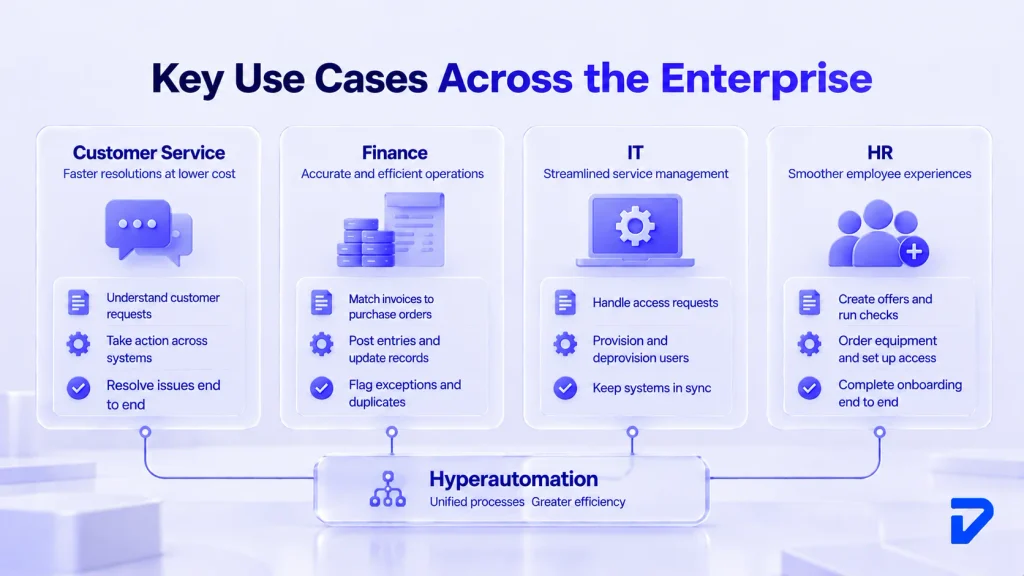
Hyperautomation earns back its cost fastest in functions with high volume, strict rules, and messy inputs. Customer service, finance, IT, and HR share those traits, which is why they usually come first in line for consolidation and why most mature AI automation services programs begin there.
Customer Service and Enterprise AI Workflow Automation
Customer service is where enterprise workflow automation is moving fastest. Gartner predicts agentic AI will resolve 80% of common customer service issues without human help by 2029, cutting operating costs by 30%. To reach that point, agents must read the order system, issue refunds, and update the CRM in one flow, which is the scope of our conversational AI solutions.
Finance IT and HR Process Consolidation Through Hyperautomation
In finance, one orchestrated flow can match invoices to purchase orders and receipts, post entries, and flag duplicates, a pattern covered in our guide to automating accounts payable with AI. IT teams fold access requests, provisioning, and offboarding into a single process tied to the HR system of record. HR, in turn, links offer letters, background checks, equipment orders, and payroll setup, so a new hire’s first day no longer depends on five separate tickets.
What Are the Common Mistakes to Avoid When Consolidating Automation Tools
Consolidation fails for predictable reasons, and speed is usually the first. Gartner expects over 40% of agentic AI projects to be canceled by the end of 2027, citing escalating costs, unclear business value, and weak risk controls. Two mistakes explain much of that attrition in automation programs as well.
Rushing Hyperautomation Without a Process Discovery Phase
Teams often buy a platform first and look for processes second. Without discovery, they automate the process they believe exists rather than the one event logs reveal, including side doors and rework loops nobody documented. A structured process mining framework for automation candidates prevents that mistake by ranking workflows on volume, variation, and exception cost before a single bot is built.
Ignoring Change Management and Citizen Developer Adoption
Automation changes jobs, and people resist changes they had no hand in shaping. The builder base is shifting too, as Gartner predicted developers outside formal IT would make up at least 80% of low-code tool users by 2026. Consolidation should give those citizen developers approved building blocks, training, and guardrails, rather than banning the tools they already rely on every week.
The Bottom Line
The hyperautomation vs. point automation tools choice is rarely all or nothing. Point tools win on upfront cost, speed, and ease of ownership for contained tasks, while hyperautomation wins once processes cross systems, pile up exceptions, and need one governed layer for AI decisions. In 2026, consolidation makes sense because agents and auditors both need that single layer, not because point tools stopped working.
Pinnasys helps teams execute whichever path fits, starting with a process inventory and a baseline cost for each workflow. From there, our AI consulting services turn that inventory into a phased roadmap, so the first orchestrated process proves its value before the next one begins. Pick one high-volume workflow this quarter and measure it honestly.
Key Takeaways from the Article
- Point tools deliver the fastest, cheapest wins for stable tasks inside one or two apps.
- Hyperautomation pays off when processes cross three or more systems with frequent exceptions.
- RPA combined with AI lifts results far more than either technology running alone.
- Tool sprawl raises license, security, and audit costs that rarely show up in budgets.
- Consolidate in phases, proving savings on one process before expanding to the next.
Frequently Asked Questions on Hyperautomation vs Point Automation Tools
What Is the Difference Between Hyperautomation and Point Automation Tools
Point automation tools handle one task in one or two apps, while hyperautomation orchestrates entire processes across many systems using RPA, AI, and integration together. Gartner introduced the hyperautomation label in its strategic technology trends list published in October 2019.
Should I Use Hyperautomation or Point Automation Tools
Use point tools for contained tasks and hyperautomation for processes that cross three or more systems. Intelligent automation services can audit an existing stack within a few weeks, since many firms run automations that no one has ever inventoried.
Is Hyperautomation Better Than Point Automation Tools for Enterprise Use
Usually, for cross-functional work. Public companies must document internal controls under SOX Section 404. One orchestration layer produces a single audit trail instead of evidence scattered across tools, which lowers the effort of every annual audit.
When Should I Choose Hyperautomation Over Point Automation Tools
Choose it once handoffs, not individual tasks, cause most delays. A practical trigger is a single order or claim passing through five or more disconnected automations, or waiting more than one business day between steps for human rework.
How Does Hyperautomation vs Point Automation Tools Compare for Mid-Market Companies
Mid-market firms, often defined as those with $10 million to $1 billion in annual revenue, usually start with point tools and add orchestration for one high-volume process. Mid-market AI programs often use managed partners instead of hiring automation architects.
Which Do I Actually Need Hyperautomation or Point Automation Tools
Most organizations need both. Keep stable single-app tasks on point tools, move cross-system and exception-heavy processes onto orchestration, and review that split every six to twelve months as volumes, costs, and AI capabilities change.