


Finance automation AI cuts invoice processing costs by up to 80% and shrinks cycle times from weeks to days. AI-powered AP workflows eliminate manual data entry, catch errors before they cost you, and give finance teams their time back to focus on higher-value work.
Manual invoice processing remains a costly bottleneck for most mid-market finance teams. According to Grand View Research, the global accounts payable automation market was valued at USD 3.07 billion in 2023 and is projected to reach USD 7.0 billion by 2030, growing at a 12.8% CAGR. The rapid growth reflects rising demand for faster invoice processing, lower operating costs, and fewer manual errors as businesses modernize their finance operations. Yet many finance teams still rely on manual invoice workflows, creating unnecessary delays, higher processing costs, and greater compliance risk.
This guide covers the key workflows worth automating, how AI-driven accounts payable differs from basic rule-based tools, the common failure points in AP automation projects, and a practical step-by-step approach to getting systems into production.
Why Manual AP Workflows Are a Financial Liability
The real cost of manual accounts payable extends far beyond the time spent processing invoices. Every invoice requires repetitive data entry, validation, approvals, payment tracking, and follow-up, increasing administrative overhead while slowing finance operations. As invoice volumes grow, manual workflows become more difficult to manage, limiting productivity, reducing cash flow visibility, and making it harder for finance teams to scale efficiently. KPMG notes that accounts payable automation improves processing efficiency, strengthens financial controls, and enhances reporting, making it an important part of modern finance transformation. AI-powered AP automation streamlines these repetitive tasks, enabling faster invoice processing, greater consistency, and more efficient financial operations.
Manual AP workflows also increase financial and compliance risk. Duplicate invoices, data entry errors, pricing discrepancies, and missed approvals can easily go unnoticed, leading to payment errors and weaker financial controls. AI automatically validates invoice data, flags exceptions, and routes invoices through standardized approval workflows before payment, helping finance teams reduce risk while improving accuracy and operational efficiency. As finance operations grow, these capabilities help organizations scale accounts payable processes without increasing manual workload.
What AI in Accounts Payable Actually Does (vs. What Rule-Based Tools Do)
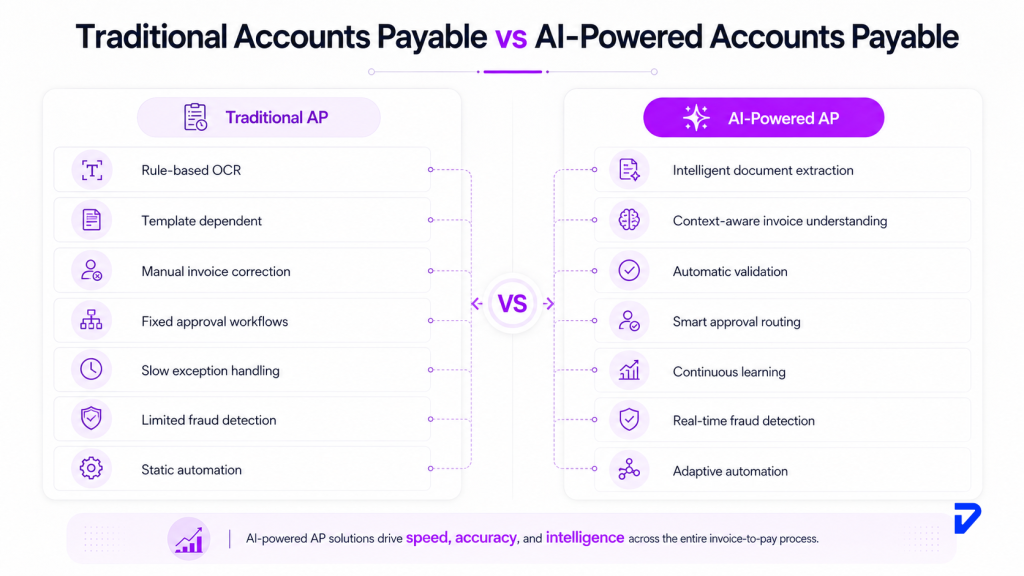
Most AP teams already have some form of automation. Invoices are scanned, data is extracted, and approvals move through predefined workflows. Yet many finance teams still spend significant time manually correcting invoice data and resolving exceptions due to the clear limitations of traditional automation.
The problem is that most of those tools are rule-based. They follow predefined scripts. When an invoice arrives in an unexpected format, comes from a new vendor, or contains missing fields, the rules break and the exception lands in a human queue.
AI-powered invoice processing works differently. It learns from your invoice history, vendor formats, approval patterns, and exception resolutions, then applies that knowledge without waiting for a human trigger. The underlying technologies include:
Intelligent Document Extraction
Traditional OCR and rule-based extraction depend on predefined templates to identify invoice fields. When an invoice format changes or a new vendor uses different terminology, finance teams often have to update templates or manually correct the extracted data. AI combines optical character recognition (OCR) with machine learning to understand invoice context instead of relying on fixed layouts. IBM notes this approach can reduce invoice processing costs from $12.88–$19.83 per invoice to under $3 by automating data extraction and validation.
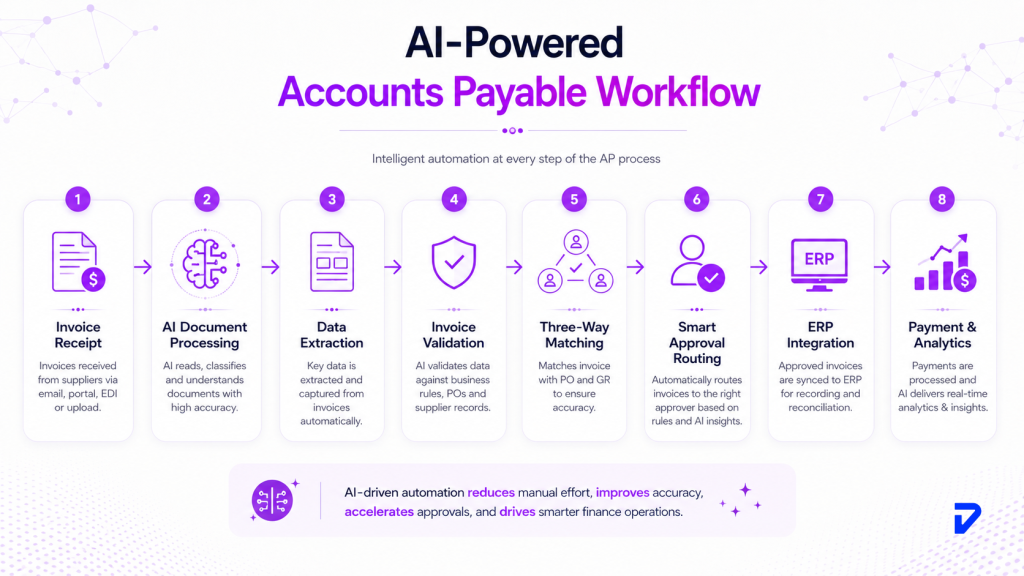
Three-Way Matching at Scale
Rule-based systems compare invoices against purchase orders and delivery receipts using predefined matching rules. Any variation outside those rules typically creates an exception that requires manual review. AI evaluates invoice data more intelligently, validating information across multiple documents while identifying genuine discrepancies. Routine invoices continue through the approval process automatically, while only invoices with meaningful exceptions are flagged for review, reducing unnecessary manual work and improving processing efficiency.
Autonomous Exception Routing
Traditional workflow tools route exceptions through fixed approval chains regardless of the issue, vendor, or approval history. AI analyzes historical approval patterns, business rules, and invoice characteristics to determine the most appropriate reviewer for each exception. Pricing discrepancies, missing purchase order numbers, duplicate invoices, or policy violations are automatically routed to the right stakeholder, reducing manual coordination, accelerating resolution, and helping finance teams maintain stronger financial controls and compliance.
Which Finance and AP Workflows Should You Automate First?
Not all finance workflows are equally ready for automation. The highest ROI comes from high-volume, repetitive tasks with structured inputs and clear validation rules. Here is where most mid-market finance teams start:
| Workflow | Manual Pain Point | What AI Fixes |
| Invoice capture & data extraction | Manual keying from PDFs, emails, scanned docs | Reads any format; extracts vendor, amounts, line items, tax |
| PO and three-way matching | Hours of cross-referencing across systems | Instant matching; flags discrepancies automatically |
| Approval routing | Manual decision on who approves what | Learned routing based on vendor, amount, cost centre |
| Duplicate invoice detection | Relies on someone noticing a pattern | Flags duplicates in real time across all transactions |
| Supplier statement reconciliation | Monthly batch work by senior AP staff | Continuous automated matching; exceptions only |
| Month-end close | Journal entries, reconciliations take days | Reduces manual journal entries significantly |
| Fraud detection | Spot checks miss sophisticated patterns | ML models scan every transaction simultaneously |
Start with invoice capture and three-way matching. These are the highest-volume, most repetitive tasks, and they generate clean training data that improves the AI’s performance over time. Fraud detection and reconciliation can follow once the core flow is stable.
How AI Fraud Detection Changes AP Risk Management
Fraud in AP is a different problem at scale. A single reviewer checking invoices manually might catch an obvious duplicate. They will miss a sophisticated vendor impersonation where the bank account changes by one digit across 20 invoices over six months.
AI-powered fraud detection is now a core capability of modern AP systems. Machine learning models analyze every invoice against your transaction history, identifying unusual patterns and potential fraud that individual reviewers can easily miss.
The types of fraud AI catches that manual processes miss:
- Duplicate invoice submissions with slight variations in invoice number or date
- Vendor bank account changes submitted through informal or unofficial channels
- Split invoicing breaking a large approval-needed amount into smaller components
- Fictitious vendor patterns based on unusual payment timing or address inconsistencies
- Internal collusion signals where approval patterns deviate from normal behaviour
Organizations that adopt AI-driven fraud prevention strengthen their ability to detect fraudulent activity before it results in financial losses. That matters because fraud in accounts payable is often discovered late, sometimes months after the fact, when recovery becomes far more difficult.
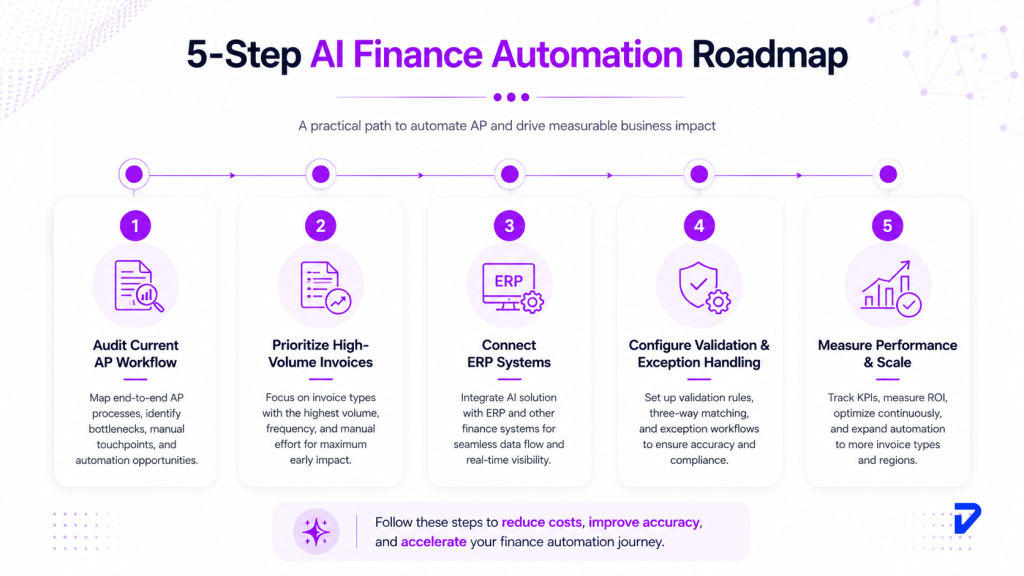
How to Implement Finance Automation AI: A Step-by-Step Approach
Most AP automation projects stall because teams try to automate everything at once, or pick a tool without mapping their actual workflow first. A phased approach produces better results and lower risk.
Step 1: Audit Your Current AP Workflow
Before selecting any technology, document every step from invoice receipt to payment. Count the manual touchpoints, the exception types, and the volume per touchpoint. This audit reveals where the real bottlenecks are, and they are rarely where teams assume.
Involve the people who work with invoices every day. Their insights often reveal manual workarounds, approval delays, and recurring issues that process maps alone may not capture. A thorough assessment helps prioritize the workflows that will benefit most from automation.
Step 2: Identify Your Highest-Volume, Lowest-Complexity Invoices
Start with the easiest category: structured invoices from regular vendors, in predictable formats, with clear PO references. These are the highest-confidence documents for AI extraction and the fastest path to measurable results.
According to IBM, organizations with mature accounts payable automation process invoices in about three days, compared to an average of 17 days for less mature organizations, demonstrating how automating standardized invoices delivers quick operational gains.
Step 3: Choose Technology That Connects to Your ERP
The automation layer must integrate cleanly with your existing accounting or ERP system. This is where most small automation projects fail: the tool processes invoices correctly but cannot post directly to the ERP, so manual re-entry remains.
Gartner emphasizes that successful invoice automation depends on seamless integration with downstream finance processes, making ERP connectivity a key consideration during vendor selection. Confirm ERP integration before selecting a vendor.
Step 4: Set Up a Validation and Exception Layer
Production-grade finance automation AI always includes a human review layer for exceptions. Set clear thresholds: invoices above a certain value, first-time vendors, or mismatched amounts route to human review. Below that threshold, the system processes autonomously.
The goal is not to review every invoice manually, but to review the right ones. A well-designed exception process allows routine invoices to move quickly while ensuring unusual transactions receive the appropriate level of oversight before payment.
Step 5: Measure, Retrain, and Expand
After the first 90 days, review your exception rate, cycle time, and cost per invoice. These are the three metrics that tell you whether the system is working. AI models improve as they process more of your invoices, so the performance in month six should significantly outperform month one.
Once the initial workflows are stable, gradually expand AI automation to additional vendors, invoice types, and finance processes. A phased rollout allows the system to adapt while giving finance teams confidence in its performance before increasing the scope.
Common Failure Points in AP Automation Projects
Most AP automation projects produce results in demos that do not survive contact with real invoice volumes. Understanding where they fail reduces the risk in your own rollout.
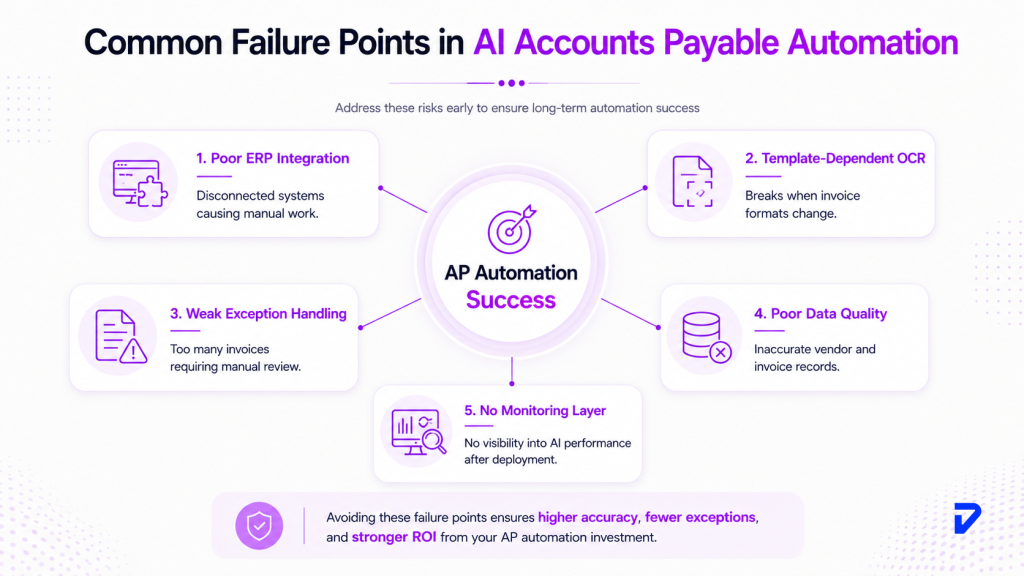
Failure point 1: Template-dependent OCR that breaks on new formats. Rule-based systems train on a fixed set of invoice layouts. When a new vendor sends a format the system has not seen, extraction fails, and exceptions pile up. AI-native systems handle new layouts by learning, not by requiring a new template each time.
Failure point 2: No clean ERP integration path. Automation that ends at data extraction, but requires manual ERP posting, saves very little time. The integration layer is the implementation detail that makes or breaks real ROI.
Failure point 3: Insufficient exception handling design. Teams often design for the happy path (structured invoice, known vendor, clear PO) and underinvest in exception routing. In production, exception handling is where the system earns or loses trust from the AP team.
Failure point 4: Skipping the data quality audit. AI models are only as accurate as the historical data they train on. If your existing AP records contain duplicate vendor entries, inconsistent naming conventions, or years of uncleaned data, model accuracy will disappoint out of the gate.
Failure point 5: Going live with no monitoring layer. Production AI needs ongoing monitoring. Exception rates, accuracy by vendor category, and processing latency all need dashboards so problems surface in hours, not months.
The Bottom Line
Finance automation AI is not an experiment for mid-market businesses anymore; it is a cost structure decision. Teams that continue processing invoices manually at $12 to $19 per invoice, in 14-day cycles, with human fraud detection, are paying a premium for a workflow that produces worse results than AI-powered systems available today.
The path from manual to automated AP does not require a rip-and-replace of your existing ERP or finance stack. It requires mapping the right workflows, choosing technology that integrates cleanly, and building a validation layer that keeps humans in control of exceptions and edge cases.
Pinnasys builds and runs production-grade AI automation for finance and operations teams who need systems that work in the real world, not just in demos. If your AP team is spending more time on data entry than on analysis, that is the place to start.
Key Takeaways from the Article
- AI automates invoice processing, reducing manual work, lowering costs, improving accuracy, and accelerating accounts payable workflows.
- Unlike rule-based tools, AI learns from historical data to handle changing invoice formats and automate exception routing.
- Automating high-volume AP workflows like invoice capture, PO matching, and approvals delivers the fastest return on investment.
- Successful implementations require ERP integration, phased deployment, human oversight for exceptions, and continuous performance monitoring.
- Most AP automation failures result from poor integration, rigid OCR, weak exception handling, poor data quality, and limited monitoring.
Frequently Asked Questions
What is finance automation AI and how does it work in accounts payable?
Finance automation AI uses machine learning and intelligent document extraction to process invoices, match them against purchase orders, route approvals, and detect fraud, without manual input. Systems learn from your historical data and improve accuracy over time.
How long does it take to implement AI-powered AP automation?
Most mid-market implementations take 8 to 16 weeks from scoping to production. Timeline depends heavily on ERP integration complexity, data quality, and the number of invoice types in scope. Phased rollouts reduce risk and accelerate early ROI.
What is the difference between RPA and AI in accounts payable?
RPA follows fixed rules and breaks when inputs deviate from expected patterns. AI-powered AP uses machine learning to handle variable invoice formats, learn approval patterns, and route exceptions intelligently. The key difference is adaptability when real-world complexity hits.
Which AP workflows should a mid-market business automate first?
Invoice capture and three-way PO matching deliver the fastest, most measurable ROI. These workflows are high-volume, repetitive, and structured, exactly the conditions where AI extraction and matching perform well from day one.
Can AI-powered AP automation integrate with existing ERP systems?
Yes. Most modern AI invoice processing platforms offer pre-built connectors for major ERP systems including SAP, Oracle, Microsoft Dynamics, NetSuite, and others. Integration quality is the critical vendor evaluation criterion, confirm it directly before committing.
How does AI reduce fraud risk in accounts payable?
AI models scan every invoice against your complete transaction history simultaneously. They flag duplicate submissions, unusual vendor bank account changes, split invoicing patterns, and anomalous approval sequences that manual spot-checks miss entirely.




Prakash C. Saini
Prakash Saini is the Founder & CEO of Pinnasys. With over a decade in digital transformation and building production systems, he grew an engineering team from 2 to 50 people and has led the delivery of 100+ production digital systems. Products built under his leadership have raised millions in funding and generated over $50 million in revenue. He holds an Executive MBA from IIM Kozhikode and today leads the AI engineering team at Pinnasys.