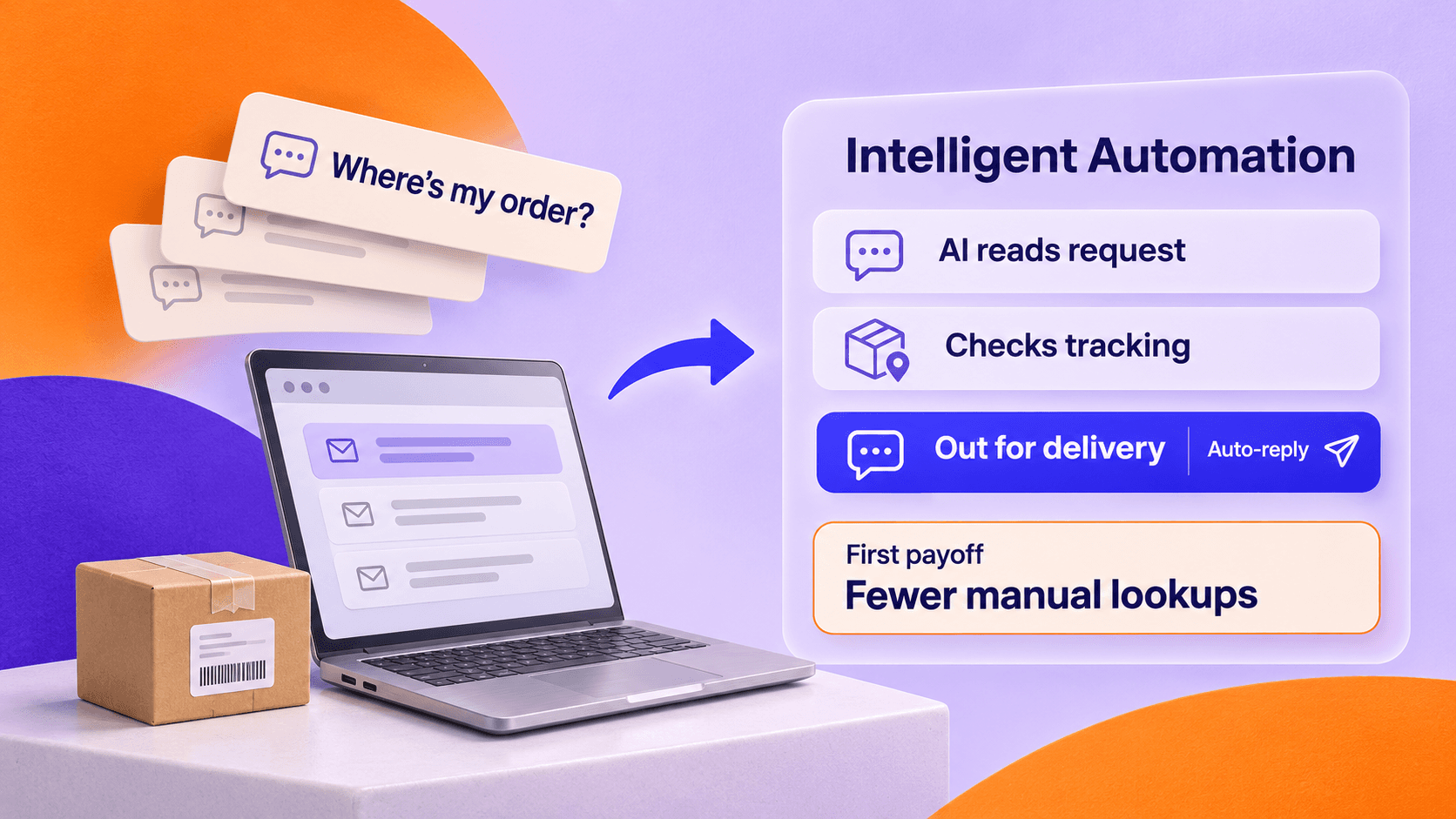
Intelligent automation combines RPA, machine learning, and document AI so software can read, decide, and act across workflows. It pays off first in the back office, where invoices, orders, and claims arrive in high volume.
Accounts payable teams in the bottom quartile spend five times more per invoice than top performers, according to APQC benchmarking. That gap rarely comes down to headcount or effort. Instead, it comes from exceptions: an invoice in a new layout, a mismatched purchase order, and an email asking about a late payment. Rules-based bots stall on exactly those cases, so people end up keying, checking, and chasing by hand.
Intelligent automation closes that gap by adding judgment to the bots, letting software handle variation and decide what happens next. Before you shortlist a tool, decide which workflow deserves the first dollar. An AI automation roadmap answers that question faster than any vendor demo. What follows covers how the technology works and where it pays off first.
What Is Intelligent Automation?
Intelligent automation (IA) pairs rules-based bots with AI judgment, so software can read messy inputs, make a bounded decision, and act in your systems. In plain terms, robotic process automation (RPA) supplies the hands, machine learning supplies the judgment, and a workflow layer keeps every step in order.
A traditional bot follows a script and stops at the first surprise. By contrast, an IA system classifies the surprise, scores its own confidence, and either resolves it or routes it to the right person.
Intelligent Process Automation, Cognitive Automation, and Hyperautomation
These labels overlap more than vendors admit. Intelligent process automation (IPA) is a synonym for IA, while cognitive automation stresses perception, such as reading handwriting or detecting intent. Hyperautomation describes the program level: an organization-wide effort to automate as many processes as possible, with process mining used to find them. For buyers, the label matters less than the workflow.
Why the Economics Changed After 2023
Until recently, adding AI judgment to every transaction cost too much for mid-market volumes. Stanford’s AI Index found GPT-3.5-level inference prices fell more than 280-fold between late 2022 and late 2024. As a result, classifying an invoice or an email now costs a fraction of a cent, so judgment can run on every item.
What Intelligent Automation Is Not
It is not a self-running digital employee. IA works best on bounded decisions with a clear right answer, such as matching, classifying, and routing. Judgment calls with legal, financial, or reputational weight still belong to people, while the system prepares evidence. Treat any pitch promising zero human review as a warning sign, because production workflows always surface edge cases.
How Does Intelligent Automation Work?
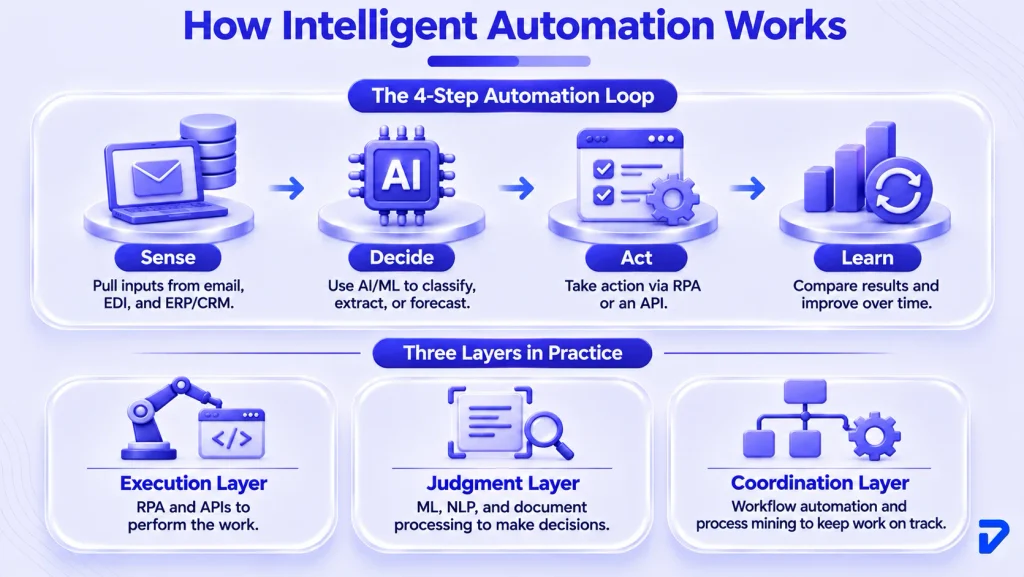
Most intelligent automation systems run a four-step loop that turns raw inputs into recorded actions and then learns from the result:
- Sense: pull inputs from email, supplier portals, electronic data interchange (EDI) feeds, and ERP or CRM records.
- Decide: apply machine learning or a language model to classify, extract, score, or forecast.
- Act: write the result back through RPA or an API, such as a posted invoice or a routed ticket.
- Learn: compare outcomes with predictions and feed human corrections into the next model version.
The decide step is where recent progress shows up most clearly. McKinsey estimates that generative AI and related tools could automate activities absorbing 60 to 70 percent of employee time, largely thanks to language understanding. Much of that time sits in emails, forms, and PDFs that older bots could never read. In practice, the loop splits into three layers, and each one needs a clear owner on your team.
The Execution Layer
RPA bots click through screens the way a person would. That helps when an older system has no API, meaning no direct software connection. However, screen-based bots break whenever a layout changes. Production teams use APIs or EDI wherever possible and keep RPA for legacy screens. For example, a bot might key approved invoices into an AS/400 system nightly.
The Judgment Layer
This layer turns unstructured inputs into decisions. Natural language processing (NLP) reads intent in emails. Meanwhile, intelligent document processing (IDP) uses optical character recognition and machine learning to extract fields from invoices and claim forms. Every prediction carries a confidence score. Items above the threshold flow straight through, and anything below it goes to a reviewer with the evidence attached.
The Coordination Layer
Workflow automation keeps multi-step work in order: who approves, what happens on rejection, and where exceptions queue. Process mining sits upstream, reading event logs from your ERP to show how work actually flows. Teams often discover that a “simple” purchase-order process runs in dozens of variants. That map shows where automation will hold and where it will break.
How Is Intelligent Automation Different from RPA?
RPA executes fixed rules on structured data, while intelligent automation adds judgment to handle variation, exceptions, and unstructured inputs across an end-to-end process. Most of the intelligent automation vs RPA debate comes down to one question: who handles the exception?
Beyond both sit agentic AI systems, which plan several actions toward a goal instead of following a fixed path. They add flexibility, but they also add cost and new failure modes. The table below compares all three on the dimensions buyers actually feel. For the last column, our guide to agentic AI vs traditional AI goes deeper.
| Dimension | RPA | IA | Agentic AI |
|---|---|---|---|
| Input type | Structured fields only | Structured and unstructured | Unstructured inputs and open goals |
| Decision logic | If-then rules | ML models with confidence scores | LLM planning within guardrails |
| Exceptions | Stops and alerts a person | Resolves common ones, routes the rest | Tries alternatives, then escalates |
| Scope | Single task | End-to-end process | Multi-step goals across systems |
| Upkeep | High when screens change | Moderate; models need retraining | Higher; needs evaluation and monitoring |
| Best first use | Stable data entry | Document-heavy back office flows | Bounded research and triage |
Where Does Intelligent Automation Pay Off First?
It pays off first in high-volume back-office workflows where mistakes are easy to reverse, and the data already sits in your systems. The survey evidence points the same way. In Deloitte’s global study, organizations that moved beyond piloting intelligent automation reported an average 32% cost reduction in the areas they targeted. Notably, those gains came from scaling proven processes rather than from adding more pilots.
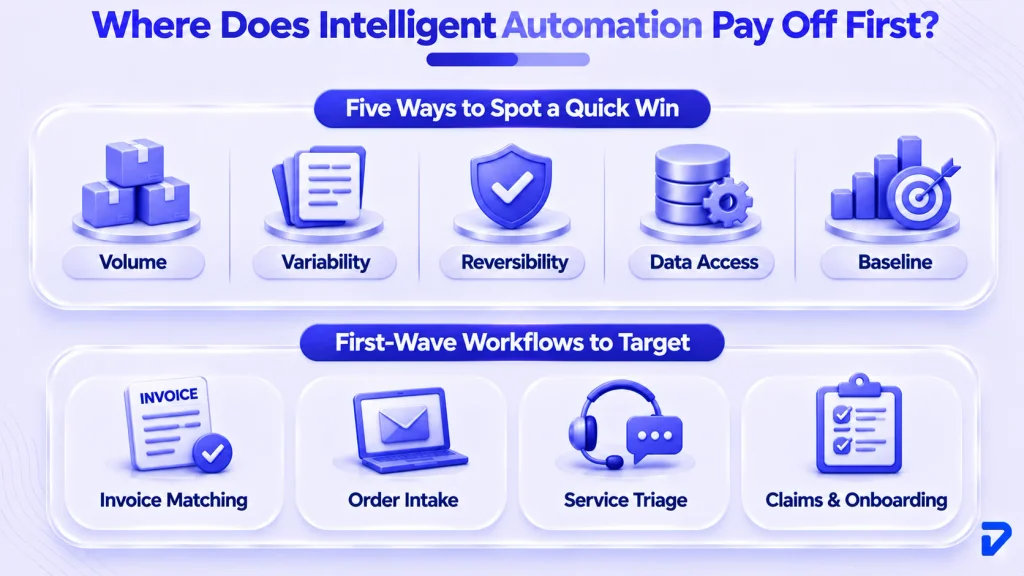
Before you commit budget, score each candidate workflow against five tests:
- Volume: hundreds of items a week, not a handful a month.
- Variability: inputs vary in format, but the right answer is knowable.
- Reversibility: a wrong call can be caught before it costs real money.
- Data access: inputs and the system of record are reachable by API, EDI, or export.
- Baseline: you can measure today’s hours, errors, and cycle time.
A workflow that passes four of the five tests is a strong first candidate. The table below shows the workflows that usually qualify.
| First-wave workflow | Why it pays off early | Metric to watch |
|---|---|---|
| Invoice capture and matching | High volume, clear outcome, easy to audit | Touchless match rate, cost per invoice |
| Order intake from email and PDF | Revenue-facing, repetitive, reversible | Order cycle time, entry errors |
| Customer service triage | Clear intents, measurable routing | First-response time, routing accuracy |
| Claims and onboarding packets | Document-heavy, rules-mostly | Straight-through rate, days to close |
Accounts Payable and Invoice Matching
Invoice matching is the classic first win. IDP extracts header and line items, and the system then compares the invoice, purchase order, and goods receipt in a check called three-way matching. Matches within tolerance post automatically, while mismatches route to a clerk with the discrepancy highlighted. Over a few months, touchless rates climb as the model learns supplier formats.
Order Intake and Customer Service Triage
Inbound orders and service emails share one trait: a person reads them, decides what they are, and retypes them. IA handles the reading and sorting, then hands clean records to your ERP or help desk. Conversational AI for support teams extends the same logic to chat by answering order-status questions before they ever become tickets.
Claims, Onboarding, and Other Document-Heavy Back Office Work
Claims packets, vendor onboarding forms, and know-your-customer (KYC) files follow one pattern: many pages, few decisions. The system classifies every page, pulls required fields, and flags missing documents, so reviewers get a ready summary. The human decision stays in place, but the hour spent assembling the file disappears. Insurers and lenders often start here because document volumes run high.
What to Leave for the Second Wave
Some workflows look attractive but carry costly errors. Changes to pricing, supplier switches, quality holds, and trade compliance calls are hard to reverse once made. Run these in suggest-only mode first, where the system recommends, and a person approves. Then track acceptance rates for a quarter, and automate only the decision types that reviewers consistently accept.
At Pinnasys, first-wave scoping starts with a workflow audit and a cost baseline rather than a platform pitch. The baseline then decides what counts as success.
Still keying invoices and orders by hand while exceptions pile up?
Pinnasys builds AI automation that reads documents, routes exceptions, and posts clean data to your ERP, so your team wins back hours weekly.
What Are Examples of Intelligent Automation by Industry?
Intelligent automation examples look different in every sector, although the underlying loop stays the same. Where the decision is a forecast rather than a match, such as setting reorder points, intelligent automation usually pairs with decision intelligence for forecasting.
Distribution and Supply Chain
Distributors juggle purchase orders, advance shipping notices, and supplier delays across ERP and EDI feeds. When a shipment notice arrives late, the workflow finds the affected customer orders, ranks possible fixes, and drafts revised dates for approval. Demand is real, since 48% of supply chain leaders rate AI’s disruptive impact as significant or greater, according to MHI and Deloitte.
Insurance and Financial Services
Claims intake is the standard entry point for insurers. IDP reads first notice of loss forms, photos, and repair estimates, while models score fraud signals and route simple claims toward fast settlement. Lenders apply the same pattern to loan packets and identity checks. Carriers modernizing intake often begin with AI claims automation for insurers before touching underwriting.
Manufacturing and Field Services
Plants and field teams generate work orders, inspection reports, and service notes in every format imaginable. Technician notes become coded failures, parts requests, and closed work orders in the maintenance system without any retyping. On the line itself, computer vision adds defect checks. Teams building AI for manufacturing operations usually connect these signals to quality data next.
Which Platforms Support Intelligent Automation?
Most intelligent automation platforms specialize in one layer, so mid-market teams usually combine three or four tools across execution, judgment, orchestration, and discovery. Company size shapes that choice more than most buyers expect. Census Bureau data show 32% of firms with 100 to 249 employees used AI in spring 2026.
That compares with 37% of firms employing 250 or more people. Smaller teams rarely have engineers to stitch platforms together, so integration effort becomes the real selection criterion.
| Platform category | Examples | Best for |
|---|---|---|
| Enterprise RPA and IA suites | UiPath, Automation Anywhere, SS&C Blue Prism | Large bot estates with legacy screens |
| Low-code workflow and iPaaS | Microsoft Power Automate, Workato, n8n | App-to-app workflow automation |
| Document AI services | Azure AI Document Intelligence, Google Document AI, Amazon Textract | Invoice, form, and ID extraction |
| Process mining | Celonis, SAP Signavio | Finding and sizing automation candidates |
| LLM and agent frameworks | Claude, GPT models, LangGraph | Classification, summaries, multi-step agents |
Whether you buy a suite or assemble components, check five capabilities before signing:
- Exception routing with named owners and response-time targets
- Audit logs of every prediction, override, and posted action
- API access to your ERP, CRM, and document stores
- Confidence thresholds that business owners can tune without code
- Pricing that scales with volume without punishing growth
For governance, map those checks to the NIST AI Risk Management Framework. It gives auditors and engineers a shared vocabulary for risk, monitoring, and accountability.
How Do You Measure Intelligent Automation ROI?
Measure ROI by comparing cost per transaction, error rate, and cycle time before and after launch, net of build and run costs. That discipline also keeps intelligent automation projects alive. RAND notes that, by some estimates, more than 80% of AI projects fail, roughly twice the failure rate of IT projects without AI.
Even among companies already using AI, financial proof remains scarce. In McKinsey’s 2026 survey, only 37% of respondents attributed any EBIT impact to AI, meaning earnings before interest and taxes. Clear metrics are what move a project into that group.
Set the Baseline Before You Build
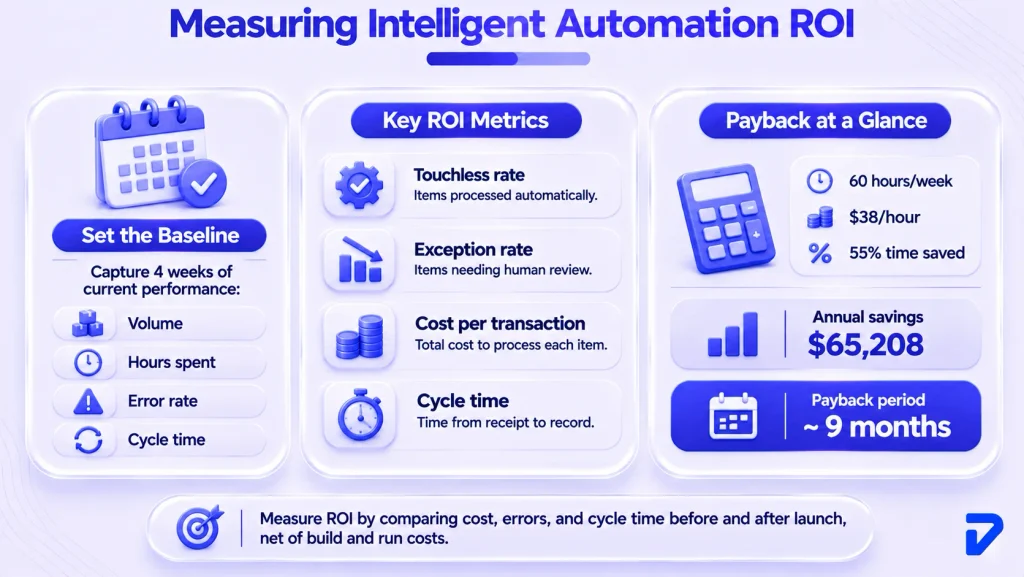
Record four weeks of current performance before any build starts: volume, hours spent, error rate, and cycle time per item. Pull these numbers from system logs rather than estimates, since memory tends to flatten manual work. An AI readiness assessment can surface data gaps during the same window. Without a baseline, every later claim is opinion.
The Metrics That Prove Value
Pick metrics your finance team already trusts, then add two that reveal automation health:
- Touchless rate: the share of items processed with no human edit
- Exception rate: the share routed to people, which should fall monthly
- Cost per transaction: fully loaded labor plus platform cost
- Cycle time: hours from receipt to posted record
Report all four monthly against the baseline.
A Simple Payback Calculation
A back-of-envelope model keeps the conversation honest. Suppose clerks spend 60 hours a week on invoice exceptions at a loaded $38 an hour, and automation removes 55% of that time:
annual_savings = 60 hrs x 52 weeks x $38 x 0.55 = $65,208
payback_months = build_cost / (annual_savings / 12)
On those numbers, a $48,000 build pays back in about nine months, before platform and model fees are netted out.
The Bottom Line
Intelligent automation earns its keep when it targets a narrow, high-volume workflow with a clear baseline rather than enterprise automation on day one. The pattern holds across sectors: start with document-heavy back-office work, keep people on costly decisions, and let measured results choose the next workflow. Platforms matter less than integration, exception handling, and the habit of tracking touchless rates every month.
Pinnasys works with mid-market operators to scope, build, and run these systems in production, and success is measured in hours saved and errors reduced. Most of that work depends on clean connections to the systems you already own, which is where AI integration and governance services come in. If one workflow keeps eating your team’s week, start there and measure it.
Key Takeaways from the Article
- IA pairs rules-based bots with machine learning to handle unstructured inputs and exceptions.
- High-volume back office workflows with reversible errors deliver the fastest, most measurable payback.
- Plain RPA stays cheaper for stable, structured tasks that never need human-style judgment.
- Agentic AI suits multi-step goals but should follow proven, well-instrumented automation wins.
- Touchless rate, exception rate, and cost per transaction prove ROI against a baseline.
Frequently Asked Questions on Intelligent Automation
How long does an intelligent automation project take to go live?
A focused first workflow, such as invoice matching, typically reaches production in 8 to 12 weeks. This covers process mapping, data connections, a suggest-only pilot, and threshold tuning, while broader enterprise automation programs often run 12 to 18 months.
Does intelligent automation replace back office staff?
It usually reshapes roles rather than removing them. Deloitte’s 2022 survey found that about one-third of employees in adopting organizations had seen their roles change. Most of that shift runs from data entry toward exception review and customer work.
Is intelligent automation secure enough for regulated data?
Yes, when it is built with role-based access, encryption, and complete audit logs. Ask vendors for a SOC 2 Type II report. Also keep sensitive document processing inside your own cloud tenant, so files never train a public model.
Can mid-sized companies afford intelligent automation?
Yes, because cloud document AI is priced per page, often around one cent per page for invoice models. A single high-volume workflow can justify the build, and starting small avoids enterprise licensing before value is proven.
How does machine learning improve automation accuracy over time?
Every human correction becomes labeled training data. Monthly or quarterly retraining on those corrections raises confidence scores, so more items clear the threshold. However, new supplier formats can lower accuracy within weeks if nobody monitors drift.