


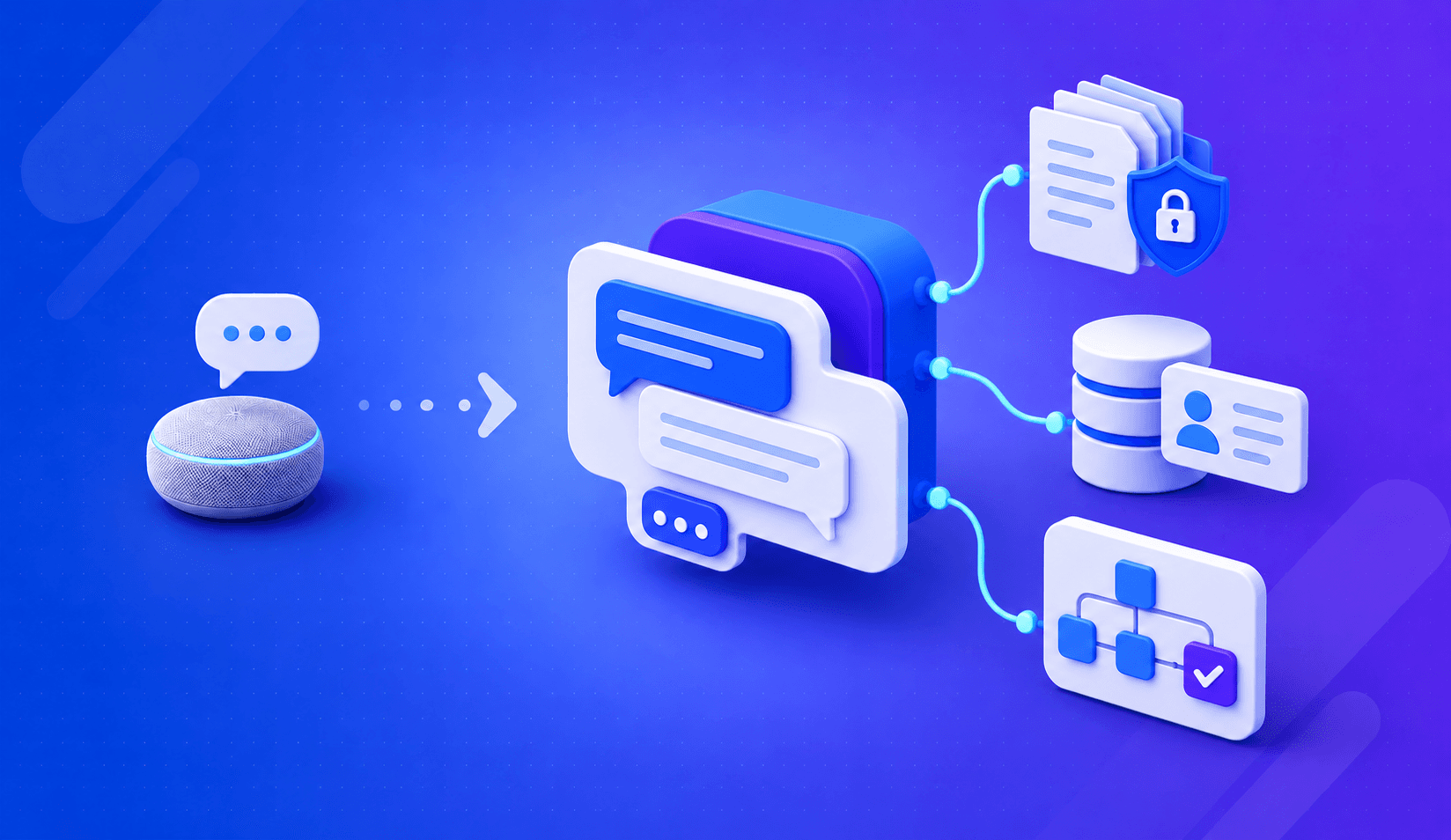
No. Siri and Alexa are built for personal tasks on consumer devices. Business conversational AI connects to your systems, operates within your data, and handles multi-step workflows. The underlying technology overlaps, but the purpose, architecture, and scope are fundamentally different.
Gartner research from late 2024 found that 85% of customer service leaders planned to explore or pilot customer-facing conversational AI in 2025. That is not a stat about Siri. It is about systems built to handle business queries, resolve customer cases, and support internal workflows at scale. Conversational AI vs. Siri and Alexa is a fair question to ask before buying. But the comparison mostly reveals how different the two categories are, not how similar. This guide walks through those differences clearly
What Is Conversational AI and How Does It Work?
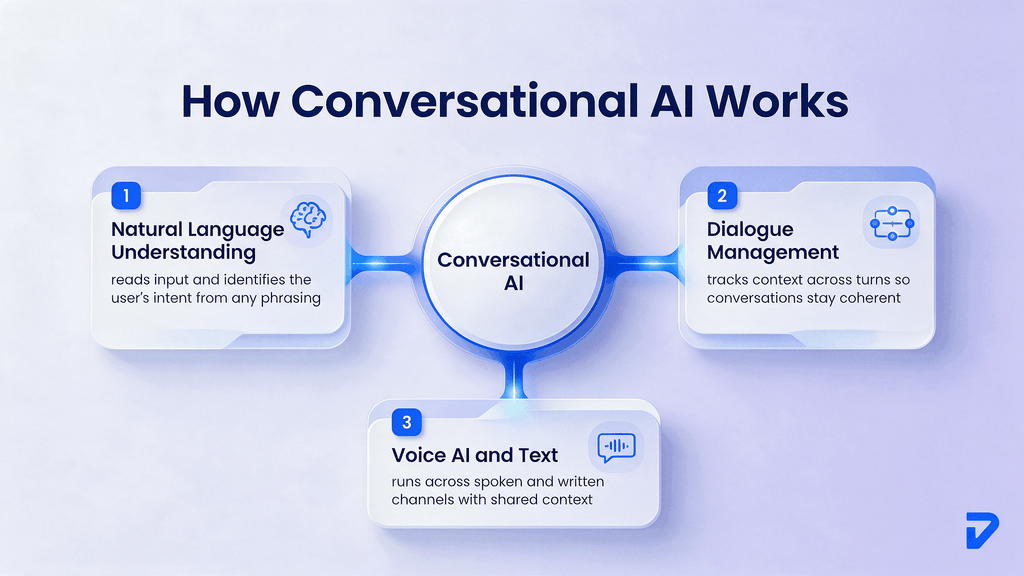
Enterprise conversational AI refers to software that can understand natural language, determine what a user intends, and respond in a way that continues a productive dialogue. It runs on a set of connected technologies: natural language understanding, dialogue management, and a language model that generates the response.
Natural Language Understanding and Intent Recognition
Natural language understanding (NLU) is the layer that reads what someone says or types and figures out what they mean. Intent recognition is a specific task within NLU. It classifies the user’s request into a defined category so the system knows what to do next.
A user types “I need to change my delivery address.” NLU parses the sentence. Intent recognition classifies this as a delivery-modification request. That classification then triggers the right dialogue path. Without this step, every message would be a guessing game.
Dialogue Management and Context
Dialogue management is what keeps a conversation coherent across multiple turns. Most business queries are not single-question transactions. A customer might confirm their order, ask about a delay, then request a refund, all in one session.
Dialogue management tracks what has already been said, maintains context across turns, and decides what the system should do or ask next. Without it, a conversational AI assistant would treat each message as a fresh start. That is the kind of frustrating experience users associate with older chatbots.
Voice AI and Text-Based Interactions
Enterprise conversational AI can run across both voice and text channels. Voice AI adds a speech recognition layer to convert spoken language into text, processes it through NLU and dialogue management, then synthesizes a spoken response. Text-based interactions skip that layer.
Business deployments often run across both. A customer might start a conversation in a web chat, escalate to a phone call, and expect the context to carry over. That cross-channel consistency is a design requirement, not an afterthought.
How Is Conversational AI Different From Siri and Alexa?
Siri and Alexa are consumer assistants. They were designed for personal use on phones, speakers, and smart home devices. They answer general questions, set timers, play music, and control connected appliances. That is a well-scoped, well-executed product category.
Business conversational AI is a different product category built for a different job. The comparison below makes the structural gap clear.
| Dimension | Siri / Alexa | Business Conversational AI |
| Data access | Public web, personal calendar, apps | CRM, ERP, internal knowledge bases |
| Task scope | Personal tasks (timers, calls, music) | Business workflows (case resolution, lead qualification, order management) |
| Organizational context | None | Connected to company-specific data |
| Permissions | Consumer account only | Role-based access control across departments |
| Integration | Consumer apps and smart home devices | APIs, databases, ticketing systems, back-office platforms |
| Customization | Limited skill/action framework | Fully configurable dialogue flows and domain knowledge |
| Compliance | Consumer privacy standards | Industry-specific governance requirements |
General Knowledge vs Business-Specific Knowledge
Siri and Alexa draw on public knowledge, your personal accounts, and a library of third-party skills. They know a lot about the world. They know nothing about your company.
Ask Siri for your company’s return policy. It will not know. Ask it to pull up a customer’s order history, check an open support ticket, or escalate a billing dispute. None of that is possible. Business conversational AI is grounded in your specific data, not general public information. That distinction is the core of the difference.
Personal Tasks vs Business Workflows
Consumer assistants are optimized for quick, single-turn requests. “Set a timer for ten minutes.” “What is the weather in Denver?” These are fast lookups or device commands.
Business workflows are rarely that simple. A customer service interaction might span order history, account status, product details, and a policy lookup before arriving at a resolution. A sales qualification conversation involves multiple questions, objections, and a handoff to a human rep at the right moment. Business conversational AI is built for that kind of sequential, multi-step work.
What Makes a Business Conversational AI Assistant Different?
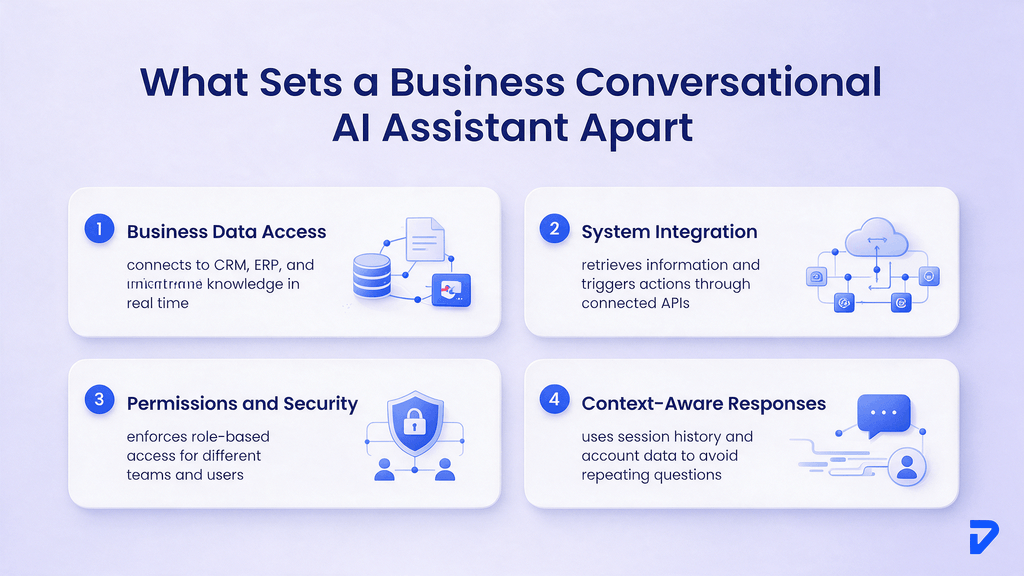
A enterprise conversational AI assistant is specifically built to operate within an organization’s data, systems, and processes. The architecture reflects that purpose in four concrete ways.
Access to Business Data
Consumer assistants access your calendar and maybe your contacts. enterprise conversational AI connects to the systems where your operational data lives: your CRM, your inventory platform, your ticketing system, your product catalog.
Salesforce’s State of Service research found that companies with unified customer service channel data are 1.4x more likely to achieve a very successful AI implementation. That finding explains why data connectivity is the first architectural question, not a feature to configure later.
Integration With Business Systems
An enterprise conversational AI assistant does not just retrieve information. It can take actions through connected systems. It can create a support ticket, update a customer record, initiate a return, or hand off a conversation with full context to a human agent.
This requires live API connections to back-office systems. Without those integrations, the assistant can only answer questions. It cannot complete the workflows that make customer service, sales support, or internal helpdesks actually function.
Permissions and Security
Enterprise conversational AI enforces role-based access. A customer-facing assistant shows only what a customer is allowed to see. An internal HR assistant answers employee queries without exposing salary data to the wrong team.
Consumer assistants have no concept of organizational permissions. They operate on a single-user model. Scaling that model to a company with hundreds of employees and dozens of departments does not work.
Context-Aware Responses
When a business assistant knows who is asking, what account they are on, and what recent interactions they have had, the quality of the response changes significantly. A customer who already submitted a return request should not be asked to re-explain the issue from scratch.
This level of context requires persistent session tracking and access to interaction history. Consumer assistants do not carry that kind of organizational context because they were not designed to.
How Does Conversational AI Handle Business Data and Systems?
The data architecture is what explains why business conversational AI requires a proper build, rather than a consumer product with an API key.
Connecting CRM, ERP, and Knowledge Sources
Most organizations store their operational knowledge across several disconnected systems. Customer history lives in the CRM. Inventory lives in the ERP. Product documentation lives in a knowledge base. HR policies live in a separate intranet.
A enterprise conversational AI assistant needs to query across those sources in real time to give useful answers. That means pre-built connectors or custom integrations for each system, with authentication handled correctly and data returned in a format the language model can reason over.
Retrieving Business Information
When a user asks a question, the system does not guess. It retrieves the relevant information from connected sources, then generates a response grounded in that data. This retrieval-augmented approach (where the model pulls context before answering) is what prevents hallucinated responses.
Taking Actions Through APIs and Tools
Retrieving information is one capability. Taking action is another. A well-built business conversational AI assistant can execute functions through connected APIs: create a ticket, update a record, send a notification, or trigger a workflow.
This is where conversational AI agents differ from basic chatbots. A chatbot responds. An agent responds and acts. The distinction matters when you are designing a system to handle high-volume workflows, not just answer FAQs.
Where Can Conversational AI Be Used in Business?
Business conversational AI has strong evidence in customer-facing roles and is growing quickly in internal and operational workflows.
Customer Service and Support
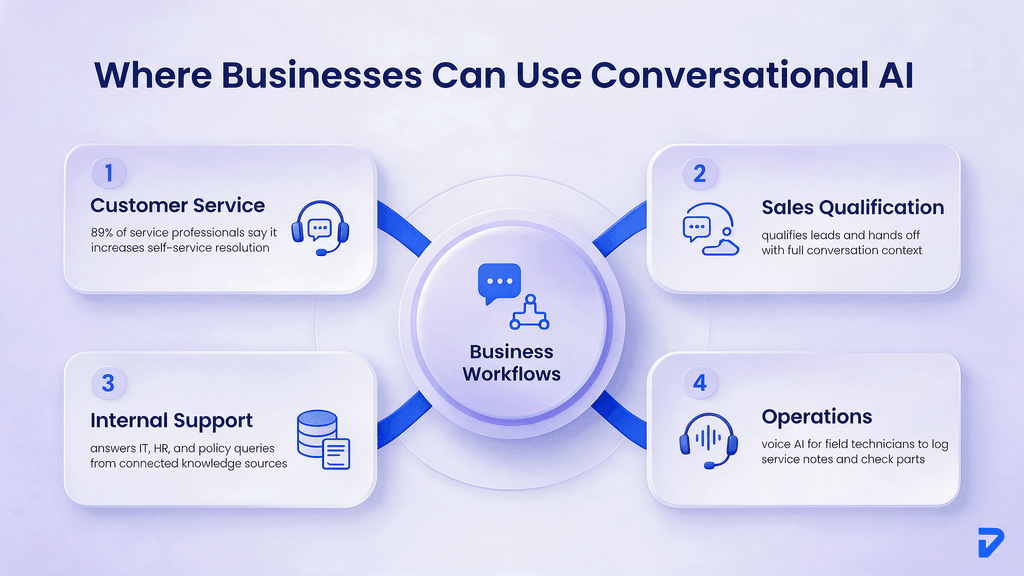
This is where enterprise conversational AI has the clearest track record. Salesforce’s 2025 State of Service report found that 89% of service professionals say conversational AI increases self-service resolution rates, and 88% say it accelerates resolution times. Those figures come from 6,500 service professionals surveyed globally.
The same report found that 30% of service cases were resolved by AI in 2025, with professionals expecting that figure to reach 50% by 2027. Customer service is the natural starting point for most mid-market businesses piloting this technology.
Sales and Lead Qualification
Conversational AI handles early-stage sales interactions well: qualifying leads by asking structured questions, routing prospects to the right rep, and handing off with a summary of what was discussed.
This works best when the qualification criteria are clear and the handoff point is well-defined. A business with a high volume of inbound leads and a consistent set of qualifying questions can see significant time savings, with reps spending more time on conversations that are already qualified.
Employee and Internal Support
Internal helpdesks deal with repetitive queries. IT ticket submissions, HR policy lookups, expense approvals, and onboarding checklists are all candidates for conversational automation, especially where contact center costs are driven by high query volumes.
Employees benefit when an assistant can answer questions using current internal documentation. A business conversational assistant can work with company policies and knowledge that general-purpose assistants like Siri or Alexa cannot access.
Operations and Workflow Assistance
In field service and operations, conversational AI helps technicians look up manuals, log service notes, and check parts availability through voice commands. That use case requires strong voice AI capability and deep integration with field service management platforms.
Do Businesses Need Conversational AI Agents or Just a Conversational AI Chatbot?
This is one of the most practical questions before a purchase. The distinction matters because the two categories have different scopes, costs, and implementation requirements.
Chatbots for Bounded Conversations
A chatbot works within a defined script. It handles a set of known intents. When the user asks something outside that set, it either fails or escalates. Chatbots are appropriate for FAQ handling, form completion, and simple transactions with a predictable path.
They are not appropriate for open-ended workflows where the user’s need might span multiple systems or require judgment calls. That is where conversational AI assistants, and specifically agents, become relevant.
Conversational AI Assistants for Multi-Step Tasks
A conversational AI assistant uses a language model to handle open-ended dialogue. It can follow a conversation across multiple turns, handle unexpected phrasing, and adapt to inputs that did not exist in a fixed decision tree.
This is more flexible than a chatbot, but it still requires clear boundaries. The assistant needs to know what it can and cannot do, which systems it can query, and when to escalate to a human. Defining those boundaries well is most of the implementation work.
When Conversational AI Agents Make Sense
A enterprise conversational AI agent adds tool use and action capability on top of dialogue. It can retrieve data, trigger workflows, and take measurable steps toward a resolution, rather than just talking about it.
Agents make sense when the workflow has a clear goal, the tools to accomplish it are well-defined, and the cost of automation is lower than the cost of human handling. High-volume, repetitive workflows with structured outputs are the best fits.
Need conversational AI that works with your business systems?
Pinnasys builds assistants around your data, workflows, and use cases.
Is Conversational AI Worth It for a Mid-Market Company?
The business case for conversational AI is real, but it depends heavily on where you deploy it and whether your data and systems are ready to support it.
Where the Business Case Usually Comes From
The clearest ROI comes from high-volume, repetitive interactions. A company handling thousands of similar customer queries per week has a different calculus than one with a small, specialized customer base. Volume and repetition are the two primary drivers.
The secondary driver is resolution cost. If a human agent handles a query that enterprise conversational AI could resolve equally well, the cost difference is measurable. That gap compounds at scale.
Processes That Are Good Candidates
Good candidates share a few characteristics. The interactions are relatively high in volume. The information needed to resolve them exists in connected systems. The resolution path is consistent enough to design. And there is a clear escalation point when the AI should hand off to a human.
Customer service, internal IT support, sales qualification, and appointment scheduling all typically fit that profile. A good AI readiness assessment can help identify which processes in your business match.
When a Simpler Automation May Be Enough
Not every conversation problem requires conversational AI. If users always ask the same three questions, a well-structured FAQ or a simple rule-based workflow might serve them better, at lower cost and with less maintenance.
enterprise Conversational AI adds the most value when the range of questions is wide enough that a static FAQ fails, but consistent enough that an AI can be reliably trained on the relevant data. That is a narrower target than it first appears.
What Should You Look for in a Conversational AI Platform?
Platform selection should follow use-case definition. Buying a platform before knowing your use case usually leads to a system that is either undersized or overbuilt.
Business System Integration
A platform is only as useful as the systems it can connect to. Check that it supports your CRM, your ticketing system, and any other platform the assistant will need to query or act on. Pre-built connectors reduce build time. Custom integrations are possible but add cost and maintenance.
Knowledge and Retrieval
The assistant needs a grounding layer: a way to retrieve answers from your actual business documentation rather than generating responses from general knowledge. This might be a RAG pipeline (retrieval-augmented generation, which fetches relevant documents before the model answers) or a structured knowledge base with search.
Without reliable retrieval, the assistant will occasionally invent answers. That is not acceptable in customer-facing or employee-facing deployments.
Security and Permissions
The NIST AI Risk Management Framework outlines four core properties for trustworthy AI: reliable, interpretable, secure, and accountable. Business conversational AI should meet all four. Permissions must be enforced at the retrieval layer. Audit logs must record what the system retrieved and what it responded. Escalation paths must be tested.
Analytics and Monitoring
You need to know how the assistant is performing. Track containment rate (percentage of conversations resolved without escalation), deflection rate (cases handled fully by AI), resolution accuracy, and escalation triggers. Without these metrics, you cannot improve the system or make the business case for expansion.
Voice and Multichannel Support
If your use case spans phone and digital channels, confirm the platform supports both. Voice AI adds latency requirements and speech recognition accuracy requirements that text-only platforms do not need to address. Check that the platform’s voice capability meets your specific quality bar, not just a general product description.
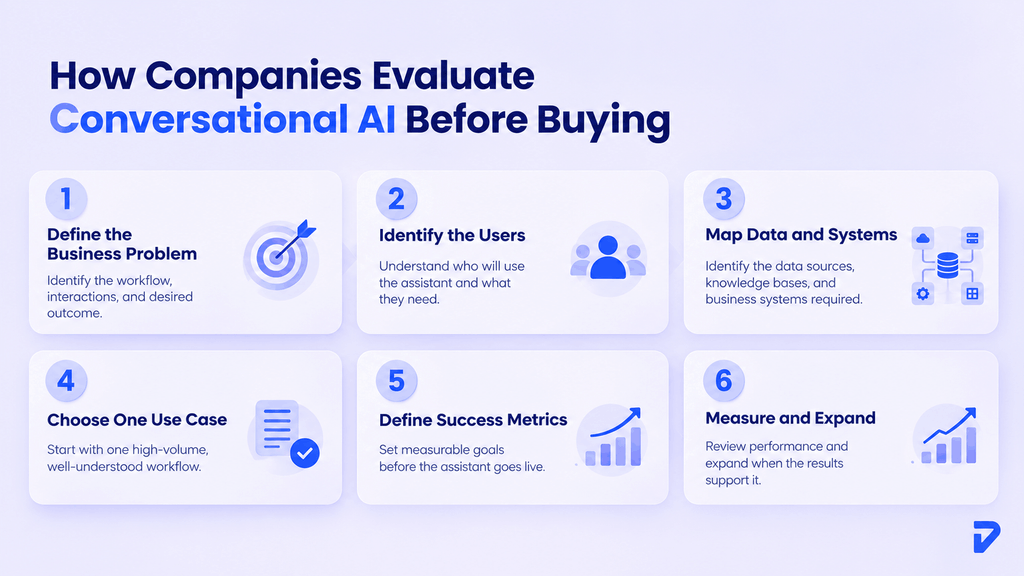
How Do Companies Approach Conversational AI Before Buying?
The Gartner data shows that 85% of customer service leaders planned to explore or pilot business conversational AI in 2025. Most successful deployments follow a deliberate sequence, rather than starting with a platform purchase.
1. Define the Business Problem
Start with the workflow you want to improve. Which interactions are you automating? What does success look like? What information will the assistant need? Clear answers make it easier to evaluate whether conversational AI is actually the right solution.
2. Identify the Users and Their Needs
Define who will interact with the assistant and what they expect from it. Customers may need quick answers and support, while employees may need access to internal information or business systems. The audience shapes the conversation flow, access requirements, and response expectations.
3. Map the Required Data and Systems
Identify the systems and knowledge sources the assistant needs to access. Customer data spread across multiple platforms can make responses harder to coordinate. Salesforce research found that unified data is associated with a 1.4x greater likelihood of very successful AI implementation.
4. Start With a Focused Use Case
Choose one high-volume, well-understood workflow for the first deployment. A focused pilot gives teams a way to test the technology, identify gaps, and establish a baseline before expanding into more complex processes.
5. Define Success Metrics Before Launch
Set measurable goals before the assistant goes live. Depending on the workflow, these might include containment rate, time to resolution, escalation frequency, task completion, or customer satisfaction. The metrics should reflect the business problem defined at the beginning.
6. Measure Results Before Expanding
Give the pilot enough time to produce meaningful data. Track performance for several weeks, review where conversations succeed or fail, and identify the changes needed. Expand only when the results show that the use case is delivering the expected value.
The Bottom Line
Siri and Alexa are useful products. They are not what a business deploys to handle customer queries, support internal teams, or qualify sales leads. Pinnasys builds conversational AI systems designed around real business workflows: grounded in your data, integrated with your systems, and maintained in production.
The gap between a consumer assistant and a business-grade system is not cosmetic. It runs through the data architecture, the integration layer, the permissions model, and the ongoing governance that keeps the system reliable. AI services extend this further, into systems that do not just converse but act on behalf of the business. When the right foundation is in place, the move from conversation to action is a logical next step.
Key Takeaways from the Article
- Consumer assistants like Siri and Alexa use personal data; enterprise conversational AI connects to your CRM, ERP, and knowledge systems.
- Intent recognition and dialogue management are what separate a coherent assistant from a message-matching script.
- Unified data is a 1.4x multiplier on successful AI implementation, per Salesforce research.
- Conversational AI agents add action capability on top of dialogue, handling multi-step workflows, not just responses.
- Start with one high-volume, well-defined workflow; measure containment rate before expanding.




Prakash C. Saini
Prakash Saini is the Founder & CEO of Pinnasys. With over a decade in digital transformation and building production systems, he grew an engineering team from 2 to 50 people and has led the delivery of 100+ production digital systems. Products built under his leadership have raised millions in funding and generated over $50 million in revenue. He holds an Executive MBA from IIM Kozhikode and today leads the AI engineering team at Pinnasys.