
Zapier suits straightforward SaaS connections, n8n fits flexible and self-hosted AI workflows, and custom code pays off only when proprietary logic, infrastructure, or access rules demand it. The n8n vs Zapier vs Custom Build choice follows workflow complexity.
20% of EU enterprises with 10 or more employees used AI technologies in 2025, up from 13.5% a year earlier. Each of those deployments has to reach the CRM, the database, and the support inbox. That connecting work, often delivered as AI integration solutions, is where workflow automation tools earn their keep. A basic connector can move a form entry into a spreadsheet, yet an AI model that reads documents, calls APIs, and waits for human approval asks far more of the plumbing. The n8n vs Zapier vs Custom Build question is really a three-way choice, because a custom build sits beside both.
This guide compares them on flexibility, integrations, pricing, privacy, scalability, and maintenance, and the right answer depends on how complex your workflows are.
What Makes AI Workflows Different From Traditional Automation?
Traditional automation executes predefined rules. AI workflows can interpret information, choose actions, and adjust execution based on the task. This changes how businesses design, monitor, and manage automated processes.
Traditional Automation vs. AI-Powered Workflow Orchestration
Traditional automation follows fixed trigger-action rules. AI-powered orchestration adds models that interpret content, classify requests, generate responses, and select workflow paths at runtime.
How AI Agents Change Workflow Execution
AI agents can call APIs, query databases, and use connected applications to complete multi-step tasks. They also need context retention, defined permissions, and approval checkpoints for consequential actions such as issuing refunds.
Why AI Workflows Need More Than Basic Integrations
AI workflows require structured inputs, output validation, monitoring, retry mechanisms, and fallback paths. These controls help prevent incorrect model responses from creating errors in business systems.
According to Deloitte’s 2026 State of AI report, 85% of surveyed companies expect to customize AI agents. This highlights the need for workflows that can accommodate specific business rules, integrations, and operational requirements.
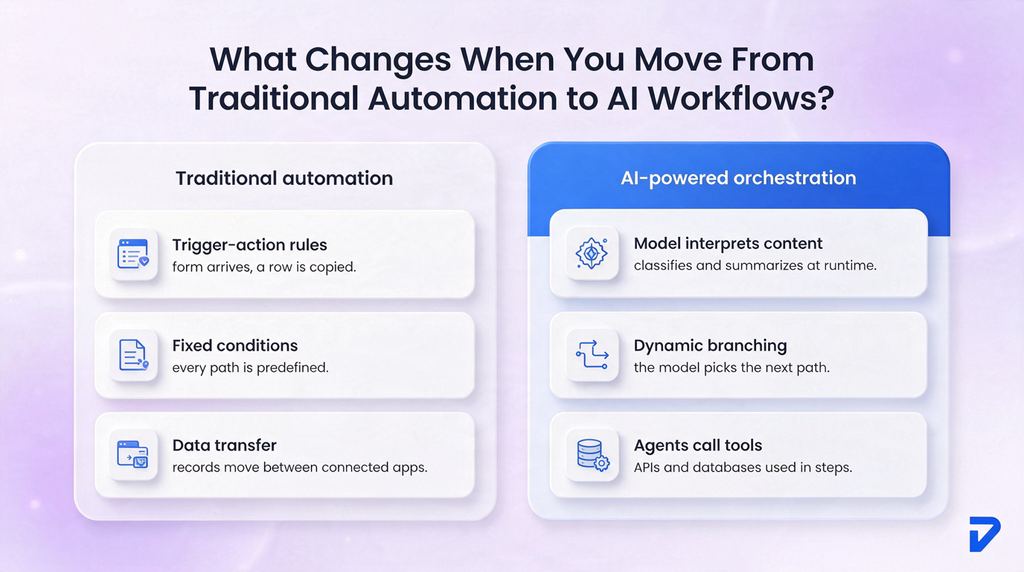
n8n vs. Zapier vs. Custom Build: Understanding the Key Differences
Choosing an automation approach depends on how much control, flexibility, and maintenance your team can handle.
Zapier: No-Code Automation for Connected Business Applications
Zapier connects business applications through visual workflows called Zaps. Users can set triggers, add actions, apply filters, and create multi-step automations without writing code. It works well for teams that want to automate routine tasks quickly using existing integrations.
In its Q2 2026 AI Workflow Index, Zapier found that AI accounted for just 18% of workflow steps among leading adopters. The remaining steps used conventional automation, logic, and app connections.
n8n: Flexible Workflow Automation With Self-Hosting Options
n8n combines a visual workflow builder with code nodes, custom API calls, and AI integrations. Teams can self-host it for greater control over infrastructure and data. However, they must also manage deployment, security, updates, and maintenance.
Custom Automation: Building Around Your Own Business Logic
Custom automation uses purpose-built services, APIs, databases, and application logic. It supports specialized requirements without relying on a platform’s predefined capabilities. The trade-off is full responsibility for development, testing, infrastructure, and ongoing support.
| Evaluation criteria | Zapier | n8n | Custom build |
| Setup complexity | Low | Medium | High |
| Coding requirements | Minimal | Optional | High |
| Self-hosting | No | Yes | Yes |
| Application integrations | Extensive | Flexible | Custom |
| AI workflow flexibility | Platform-dependent | High | Full control |
| Infrastructure ownership | Vendor-managed | Optional | Full control |
| Maintenance responsibility | Low | Medium to high | High |
| Cost structure | Task-based | Execution-based | Engineering + infrastructure |
This is a qualitative comparison, and plan-specific limits vary by vendor and subscription.
Only 15% of IT application leaders were considering, piloting, or deploying fully autonomous AI agents, according to Gartner’s May and June 2025 survey of 360 respondents. Yet 75% were working with some form of agent. Adoption and full autonomy are different things, so a Zapier vs n8n decision should follow operational requirements, not AI hype.
n8n vs. Zapier Pricing: What Does Each Workflow Actually Cost?
Pricing depends on how each platform counts usage and the resources needed to maintain workflows.
How Zapier’s Task-Based Pricing Works
Zapier charges for successful action steps.
- Each successful action generally counts as one task.
- Triggers, filters, and paths are not billed.
- Three actions running 100 times consume 300 tasks.
- Some features, such as MCP tool calls, may use additional tasks.
How n8n’s Execution-Based Pricing Works
n8n Cloud counts complete workflow runs, regardless of the number of steps.
- One run counts as one execution, whether it has two steps or fifty.
- Longer AI workflows can benefit from this pricing model.
- Self-hosting avoids cloud execution fees but adds infrastructure and maintenance costs.
What a Custom Automation Stack Costs to Build and Maintain
A custom system comes with several ongoing expenses:
- Development: Integrations, logic, and testing.
- Infrastructure: Hosting and databases.
- Usage: API fees and LLM consumption.
- Maintenance: Monitoring, upgrades, and developer support.
How to Calculate Total Cost of Ownership
Compare the full cost over 12–24 months:
TCO = Development + Hosting + API Fees + LLM Usage + Maintenance
According to Flexera’s 2025 State of the Cloud Report, 84% of organizations identified managing cloud spend as a top challenge. Subscription fees alone do not reflect the full cost of automation.
Which Platform Handles Complex AI Workflows and Integrations Better?
The n8n vs Zapier vs custom build comparison depends on how much flexibility your AI workflows and integrations require.
Both n8n and Zapier connect LLMs, APIs, and business applications. However, n8n offers more flexibility for custom API calls, vector databases, and AI agent configurations. These capabilities are useful for AI enterprise search and agentic AI development.
Zapier offers a more guided setup, while custom orchestration supports specialized business rules and multiple cooperating agents.
API design also affects reliability. According to Postman’s 2025 State of the API Report, only 24% of surveyed developers design APIs with AI agents in mind. Clear API schemas, consistent responses, and scoped permissions help agents interact reliably with external systems.
Ready to build smarter AI workflows?
Pinnasys helps businesses choose, integrate, and scale AI automation solutions.
Self-Hosting, Data Privacy, and Infrastructure Control
n8n’s Community edition supports self-hosting through Docker, giving teams control over infrastructure, credentials, and data. However, teams must manage backups, updates, and security.
Zapier operates as a managed cloud service. It handles infrastructure and provides security controls, but offers less deployment and data-location control. Custom infrastructure is worth considering when workflows require private network access, specific data residency, or proprietary databases.
Cisco’s 2025 Data Privacy Benchmark Study found that 90% of surveyed organizations believed local storage is inherently safer. Actual security requirements and data-handling policies should guide infrastructure decisions.
Scalability and Reliability: What Happens When Workflows Grow?
As workflow volume increases, execution capacity, error recovery, and monitoring become important. The main requirements include:
- Execution scaling: n8n supports Redis-based queue mode and worker processes, while Zapier scales through managed infrastructure.
- Error recovery: Retry policies, execution logs, alerts, and duplicate prevention help manage failed runs.
- AI monitoring: Track token usage, response latency, failed tool calls, and output quality.
Moving Beyond n8n and Zapier: When to Consider a Custom Build
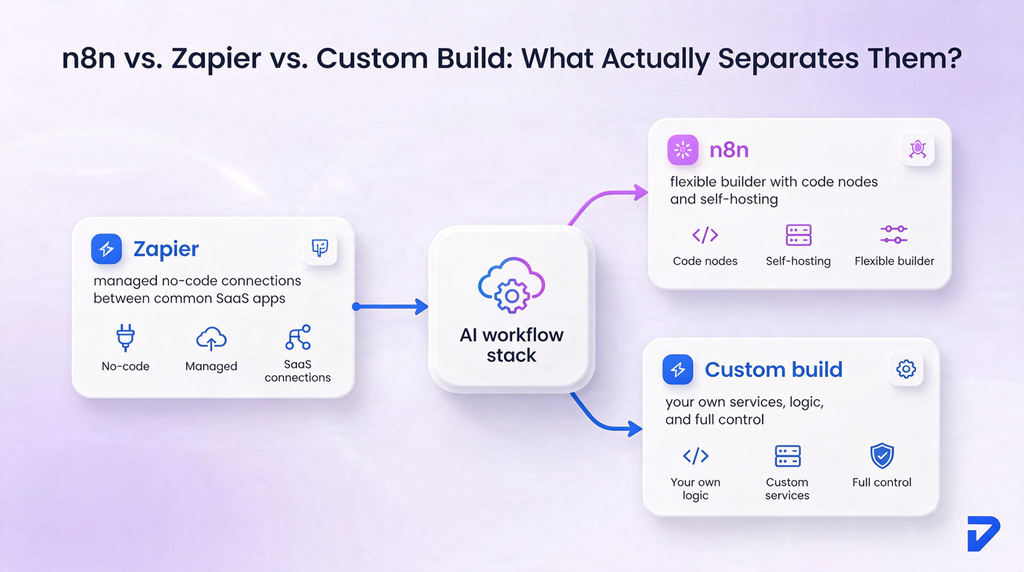
In an n8n vs Zapier vs custom build evaluation, Zapier may become difficult to manage when task costs rise, integrations are missing, or workflows involve complicated conditions. n8n may require additional custom services when specialized state management, authorization, or performance requirements exceed the existing setup.
A custom build makes sense when proprietary business logic and deeper integrations justify development and maintenance costs. Teams can also combine n8n with custom APIs, using n8n for orchestration and dedicated services for specialized processing.
IBM’s 2025 Cost of a Data Breach Report found that 13% of organizations reported an AI-related breach, and 97% of those lacked proper AI access controls. Any custom automation architecture must account for security and permissions from the beginning.
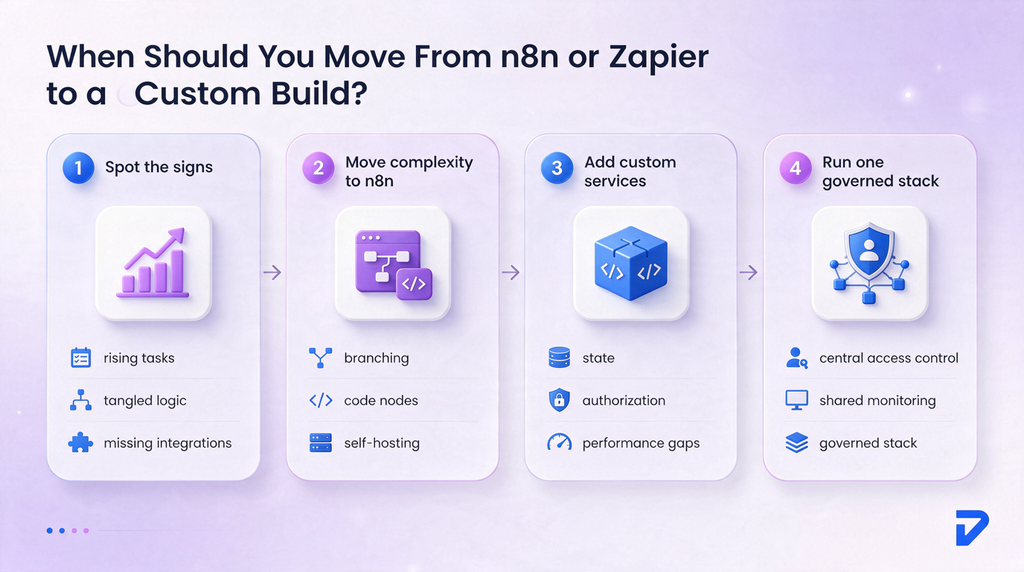
A Decision Framework for Choosing Your AI Workflow Stack
Choose Zapier If You Need
Zapier fits when speed and simplicity outweigh control:
- Quick deployment, often within an afternoon
- Common SaaS integrations already in its catalog
- Straightforward trigger-action workflows with a handful of steps
- Minimal coding, so non-engineers can build and maintain Zaps
- Vendor-managed infrastructure with no servers to patch
Choose n8n If You Need
When the n8n vs Zapier decision turns on flexibility, n8n wins:
- Flexible workflow orchestration with branching and loops
- Self-hosting options for residency or cost control
- Custom API connections through HTTP and code nodes
- AI agent integrations with models, memory, and tools
- Code-level customization in JavaScript or Python
- Greater control over execution logic
Choose Custom Development If You Need
Custom development fits when no platform can express the requirement:
- Proprietary automation logic no platform can express
- Deep internal system integration, including private networks
- Specialized infrastructure and deployment environments
- Advanced authorization requirements beyond platform roles
- Custom AI application architecture
- Full control over application behavior
| Business requirement | Recommended approach |
| Basic SaaS integrations | Zapier |
| Quick no-code automation | Zapier |
| Self-hosted workflows | n8n |
| Complex API integrations | n8n or custom |
| AI agent orchestration | n8n or custom |
| Proprietary business workflows | Custom build |
| Specialized infrastructure | Custom build |
| Hybrid automation architecture | n8n + custom services |
Questions to Ask Before Making the Decision
Settle these with your team or AI consulting services:
- How complex are the workflows?
- Which apps and databases need integration?
- Is self-hosting required?
- How much AI control is needed?
- Expected volume?
- Who handles maintenance and monitoring?
- What is the 24-month cost?
Choose the simplest architecture that meets current requirements without needless limits.
Building an AI Workflow Stack That Can Grow With Your Business
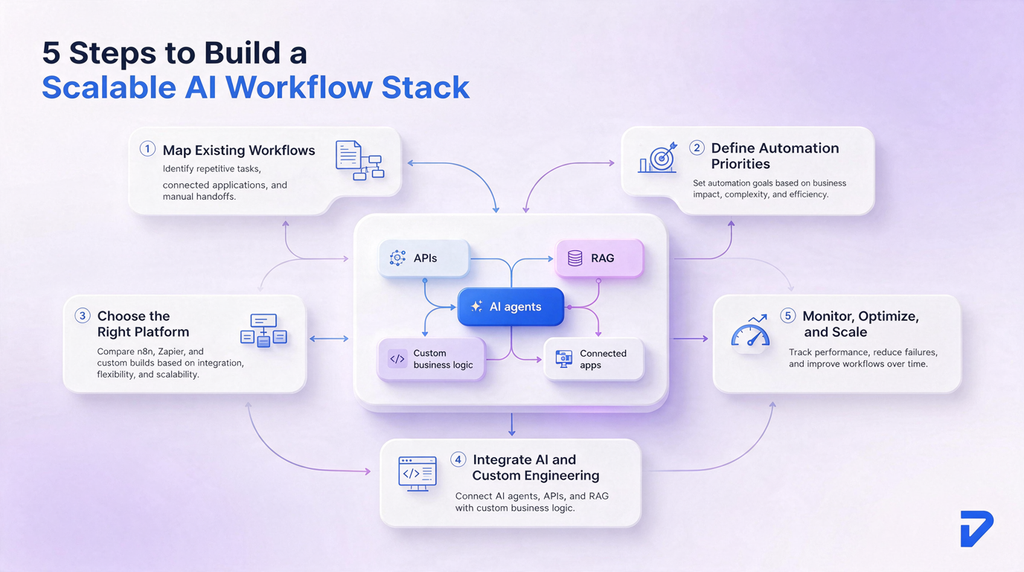
A scalable AI workflow stack starts with the right processes, tools, and integrations. These five steps help businesses build an automation system that supports current operations and future growth.
1. Map Existing Business Workflows
Start by identifying repetitive business processes, the applications involved, and the dependencies between them. Document how information moves between teams and systems, where manual handoffs occur, and which tasks consume the most time. This creates a clear picture of what needs automation.
2. Define Automation Priorities
Not every business process needs AI or automation. Evaluate workflows based on their frequency, complexity, business impact, and potential for improvement. Set measurable objectives, such as reducing processing time, lowering manual errors, or improving response times. These priorities help determine where automation can deliver meaningful results.
3. Choose the Right Automation Platform
Compare n8n vs Zapier vs custom build based on integration requirements, workflow complexity, scalability, and data control. Zapier may suit straightforward application connections, while n8n offers greater workflow flexibility. A custom build becomes relevant when business requirements demand specialized logic, deeper integrations, or greater control.
4. Integrate AI and Custom Engineering
Combine workflow orchestration with AI agents, API integrations, and retrieval-augmented generation (RAG). Use AI agents for tasks involving contextual decisions, APIs to connect core business applications, and RAG to retrieve relevant information. Custom engineering can address requirements that standard automation platforms cannot support.
5. Monitor, Optimize, and Scale
Once workflows are operational, monitor execution failures, processing times, API usage, and operational costs. Establish human review for sensitive or high-impact decisions. Regular performance checks help identify bottlenecks, improve reliability, and determine when additional integrations or infrastructure are needed as business requirements evolve.
How Pinnasys Helps Businesses Build AI Automation Solutions
Pinnasys helps businesses evaluate, design, and implement automation systems based on their operational requirements. Its services cover AI automation, AI integration, agentic AI, and custom AI development. The team also supports consulting and architecture planning for businesses that need engineering expertise without building an in-house AI team.
Conclusion
Zapier suits straightforward business automation and ready-made integrations, which makes it the fastest path when workflows are linear and the apps are common. n8n offers greater flexibility, self-hosting options, and workflow customization, which suits AI workflows that outgrow templates, and that is the core of the n8n vs Zapier choice. Custom development makes sense when specialized business logic, infrastructure, or integration requirements justify the engineering investment and the upkeep that follows. Pinnasys helps teams choose among all three and build the result, from AI services planning through production. Pick the stack that matches your operational requirements, not the platform with the longest feature list, and revisit the choice as workflows and volume grow.
Key Takeaways from the Article
- Zapier handles linear SaaS workflows fastest, with the least infrastructure to manage.
- n8n bills per execution and self-hosts, which favors long, AI-heavy workflows.
- Total cost of ownership includes hosting, model usage, and maintenance, not only subscriptions.
- Custom builds earn their cost when proprietary logic or access rules exceed platform limits.
- A hybrid of n8n plus custom services often beats choosing one approach outright.
Frequently Asked Questions
What is the difference between n8n and Zapier?
Zapier is a vendor-managed no code platform that bills per successful task, while n8n is a flexible, self-hostable builder that bills per workflow execution and adds code nodes. Zapier favors speed of setup; n8n favors control and complex branching.
Is n8n better than Zapier for AI workflows?
For multi-step agents, RAG, and human approval, n8n’s AI nodes and code access give more control. Zapier’s ready-made integrations remain enough when AI is only one simple step, such as classifying an incoming email.
Can n8n be self-hosted?
Yes. The free Community edition runs in Docker, ideally with PostgreSQL 13 or newer for production, and queue mode adds Redis. Your team handles updates, backups, monitoring, and security, which is the real cost of self-hosting.
How do n8n and Zapier pricing compare?
Zapier counts each successful action as a task, so a three-action Zap run 1,000 times uses 3,000 tasks. n8n counts those same runs as 1,000 executions, though self-hosting adds server, database, and maintenance costs.
When should a business build custom workflow automation?
Build custom when automation is core to the product, proprietary systems need deep integration, or access rules, data residency, or performance targets exceed platform limits. Confirm engineers can maintain it, because upkeep outlasts the first release.
Can n8n and Zapier work with AI agents?
Yes. n8n offers an AI Agent node with connectable models, memory, and tools, plus human approval for tool calls. Zapier also supports AI steps and agents, with a more guided setup and less low-level customization.
When have you outgrown Zapier?
Typical signs are task bills rising with every added step, tangled conditional logic, data transformations the builder cannot express, and integrations missing from the catalog. Once workarounds cost more than the automation saves, evaluate n8n or custom code.
Is n8n suitable for production AI automation?
Yes, with the right setup. Run queue mode with workers, PostgreSQL, and Redis, configure error workflows, and add monitoring, backups, and approval steps for risky actions. Production self-hosting also means your team owns security and updates.