


An AI system inventory template is the structured starting point for understanding every model, agent, API, and tool your business already runs. Without one, you cannot govern, optimize, or scale AI with confidence.
AI adoption rarely happens through one coordinated rollout. It spreads function by function, team by team, and vendor by vendor. Stanford HAI’s 2025 AI Index found that 88% of organizations reported using AI in 2025, up from 78% the year before. That rapid expansion has left many businesses with a sprawling, partially documented stack of AI tools, models, agents, and integrations they do not fully understand. The result is duplicated capability, orphaned systems, untracked risk, and wasted spend.
A disciplined AI system inventory changes that. It gives you a single, structured record of everything AI-related running in your business, who owns it, what it connects to, and what it costs. This guide covers the template, the process, and the governance needed to make that record useful.
Why Businesses Need An AI System Inventory
AI stacks are growing faster than teams can document them. Salesforce found that AI-agent users average 1,103 applications and 22 AI models, versus 762 applications and 15 models for others.
- Map every AI asset: Track models, agents, chatbots, applications, APIs, and third-party AI tools across the business.
- Document dependencies: Record the data sources, models, applications, APIs, and tools connected to each system.
- Assign ownership: Identify who owns each AI system, its outputs, costs, and ongoing maintenance.
- Track risk and governance: Capture data access, security, compliance, monitoring, and model-related risks.
- Find duplication and gaps: Identify overlapping capabilities, unused systems, orphaned tools, and missing integrations.
- Guide architecture decisions: Use the inventory to decide what to retain, integrate, upgrade, replace, or retire.
What an AI System Inventory Should Capture
A common mistake is tracking only the most visible AI tools while missing the models embedded in SaaS platforms, the internal agents built by individual teams, and the third-party APIs quietly powering core workflows. Coverage has to be wider than most teams expect.
Models And AI Applications
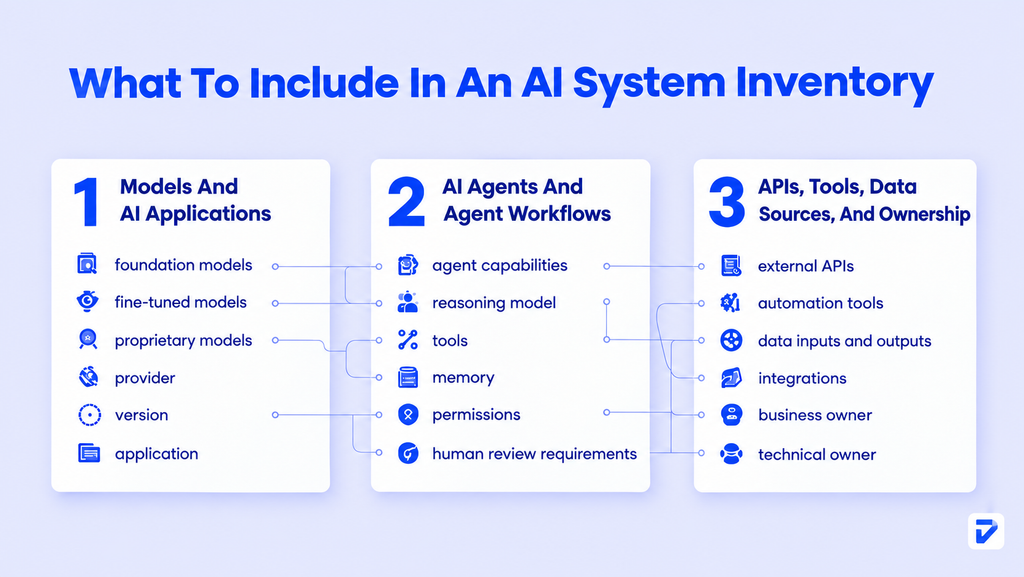
Catalog every AI model in use, whether it is a foundation model accessed via API, a fine-tuned variant, or a proprietary model embedded in a vendor product. Note the model name, version, provider, and the application it powers. Salesforce’s research found that the average number of AI models used by organizations doubled from 9 to 18 in one year. Your inventory needs to keep pace with that growth rate.
AI Agents And Agent Workflows
Agents are distinct from models. An agent uses a model as its reasoning core but wraps it in planning logic, tool access, and memory. Gartner predicts that 33% of business software applications will include agentic AI by 2028, up from less than 1% in 2024. Catalog each agent separately: what it can do, which tools it calls, and what decisions it is permitted to make without human review.
APIs, Tools, External Services, Data Sources, And Ownership
Beyond models and agents, your inventory needs to capture every external API, automation tool, and data integration in the AI stack. Note the data source each system reads from, the systems it writes to, and who is the named business and technical owner. Ownership is the detail most inventories skip. Without it, you cannot audit, update, or decommission a system when something goes wrong.
The AI System Inventory Template
A good AI system inventory template is a structured register, not a freeform spreadsheet. Every row represents one AI asset. Every column answers a specific governance question. The table below shows the core fields your template should include.
Core Inventory Fields
| Field | What to capture |
| Asset name | The name of the model, agent, tool, or integration |
| Asset type | Model / Agent / API / SaaS tool / Workflow automation |
| Provider | Vendor or internal team responsible for the asset |
| Version/release | Current version or deployment date |
| Business function | Department and process this asset supports |
| Primary use case | What the asset does in plain language |
| Data inputs | What data it reads, and from which source systems |
| Data outputs | What it produces, and where that goes |
| Integration dependencies | Which other systems it connects to |
| Technical owner | The person or team accountable for the system |
| Business owner | The stakeholder accountable for the output and decisions |
| Risk classification | Low / Medium / High, based on data sensitivity and decision scope |
| Compliance flags | Relevant regulations, data residency requirements, or audit needs |
| Lifecycle status | Active / Under review / Scheduled for retirement |
| Last reviewed | Date of most recent audit or ownership confirmation |
AI Asset Inventory Worksheet Structure
The worksheet works best as a flat register with one row per asset, maintained in a tool with version history (a shared spreadsheet, a configuration management database, or a dedicated AI governance platform). A flat structure beats a hierarchical one for initial inventory work. Hierarchy comes later, once you understand the dependency relationships between assets.
Salesforce’s Connectivity Benchmark research found that 50% of an organization’s internal software assets are available for internal reuse on average. An inventory makes that reuse visible, which is where cost savings typically start to appear.
Ready to bring visibility to your growing AI stack?
Pinnasys helps you inventory, assess, and organize AI systems so your business can build a clearer path to scalable AI adoption.
How To Build An AI System Inventory From Scratch
Most organizations start with a blank spreadsheet and underestimate how many systems they will find. The process below is structured to surface the full picture rather than just the obvious assets.
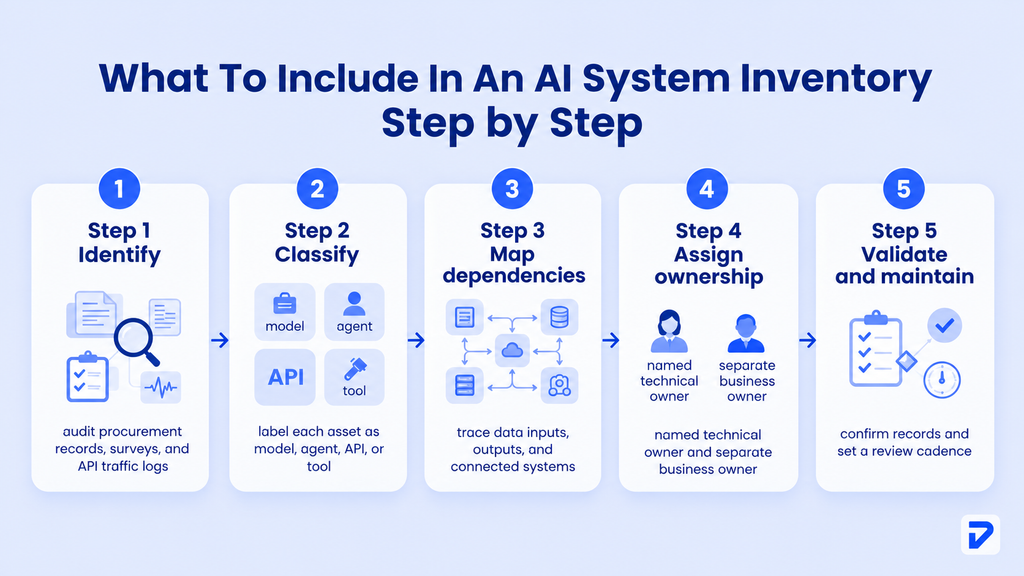
Step 1: Identify Every AI System
Start with three parallel discovery tracks. First, audit procurement records and vendor invoices for any subscription or API contract with an AI or machine-learning component. Second, survey department heads and team leads with a short structured questionnaire asking what AI tools their teams use and what those tools do. Third, work with your IT and security teams to pull API traffic logs and SaaS integrations, which will surface systems that were never formally approved.
Step 2: Map Models, Agents, And Tools
Once you have a list of systems, classify each one. A model is the AI core. An agent is the orchestrated system around it. A tool is something the agent or a workflow calls (a search API, a database lookup, a document parser). Getting the classification right matters for governance, because agents carry different accountability requirements than passive tools.
McKinsey’s State of AI 2024 report found that 65% of organizations were regularly using generative AI in at least one business function, and half had adopted it in two or more functions. That means most organizations already have a multi-function AI stack requiring cross-departmental inventory work.
Step 3: Document Dependencies And Data Flows
For each asset, trace its data inputs and outputs. Which source systems does it read? What does it write back, and where? Which other AI systems does it call? Dependency mapping is the step most teams rush, and it is the one that prevents production incidents. An agent that calls three external APIs without documented fallback behavior is a risk waiting to surface.
Step 4: Assign Ownership And Validate
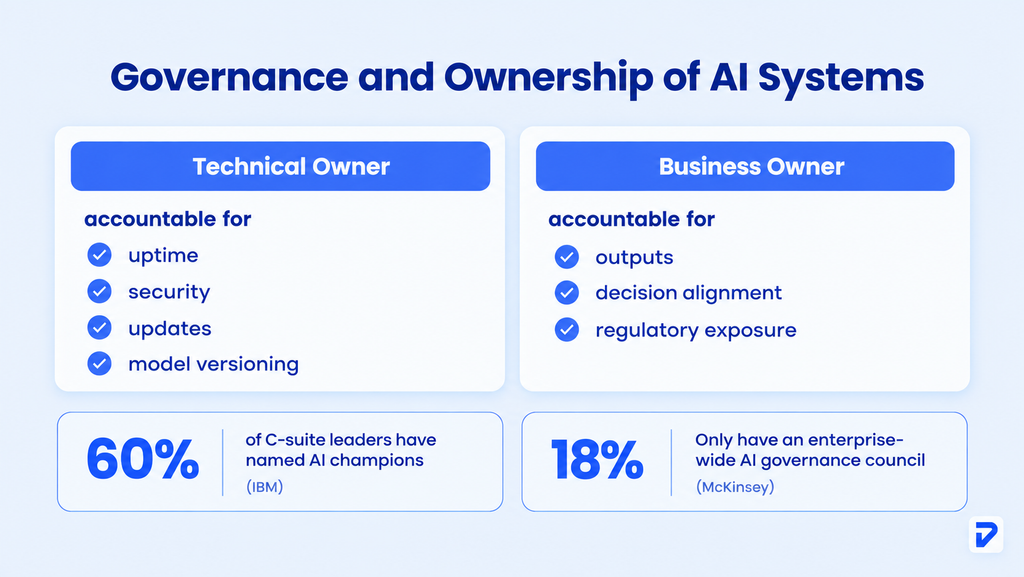
Every asset needs a named technical owner (accountable for uptime, updates, and security) and a named business owner (accountable for the outputs and their use in decisions). After assignment, send each owner the draft inventory record for that asset and ask them to validate it. This step finds errors, surfaces undocumented dependencies, and starts the ownership culture the inventory depends on.
Step 5: Consolidate And Maintain
Merge the validated records into a single register. Remove duplicates. Flag gaps where ownership or dependency data is still missing. Set a review cadence: quarterly for high-risk assets, semi-annually for low-risk ones. McKinsey found that 44% of organizations had experienced at least one negative consequence from generative AI use, most commonly involving inaccuracy or cybersecurity. A living, maintained inventory is the first line of defense against those outcomes.
Mapping AI Agent Architecture and Dependencies
Understanding how your agents connect to models, tools, and data is as important as listing them. The inventory should capture architecture, not just asset names.
How Agents Connect To Models And Tools
Most production agents follow a pattern: a user or system trigger sends a task to an orchestration layer (a framework like LangGraph or custom logic), which routes it to a model, then calls tools based on the model’s output. That chain has multiple failure points. Your inventory should document the orchestration layer for each agent, the model it uses, and the specific tools in its permitted tool set.
Gartner predicts that by 2027, one-third of agentic AI implementations will combine agents with different specializations to handle complex tasks across applications and data environments. Multi-agent architectures multiply the dependency surface, which makes architecture documentation in the inventory non-optional.
Model Routers And Orchestration Layers
A model router (a system that selects which model handles a given request based on cost, latency, or capability) is an increasingly common component in production AI stacks. Document it as its own asset. It has dependencies, failure modes, and cost implications that need tracking separately from the models it routes between.
APIs, External AI Services, And Generative AI Integration
Generative AI integration typically runs through external APIs: OpenAI, Anthropic, Cohere, or a cloud provider’s hosted model service. Each API endpoint is a dependency. Record the endpoint, the authentication method, rate limits, data-handling terms, and the fallback behavior if the API is unavailable. AI agent development services that do not document these dependencies at build time create inventory debt that surfaces as a governance problem later.
Governance And Ownership Across The AI System
Every AI asset needs clear technical and business ownership. The technical owner manages reliability, security, and updates, while the business owner oversees how outputs are used. IBM found that 60% of C-suite executives had placed clearly defined AI champions throughout their organizations, reinforcing the need for dedicated accountability.
Lifecycle management keeps AI systems controlled as they change. Track each asset as active, under review, or scheduled for retirement, with access, monitoring, and review requirements. McKinsey found that only 18% of organizations reported having an enterprise-wide council with authority over responsible AI governance decisions, highlighting the need for structured oversight.
How Long Does an AI System Inventory Take To Implement?
There is no universal timeline. It depends on the number of AI assets, business functions, documentation quality, ownership clarity, and integration complexity. Salesforce found organizations using AI agents average 1,103 applications, while its research also found AI model counts doubled from 9 to 18 in one year, showing how quickly inventory scope can change.
For a mid-market organization with AI active across two to five functions, a four-to-eight-week first pass is a reasonable planning range. This can cover discovery, classification, dependency mapping, ownership assignment, validation, and consolidation. The more important goal is maintaining a continuously updated register rather than allowing the first inventory to become a static spreadsheet.
Common Gaps In AI System Inventories
An incomplete inventory can create as much risk as having no inventory. Avoid these common gaps when building and maintaining yours.
- Tracking models without dependencies: Record the data sources, APIs, applications, and downstream systems connected to each model.
- Ignoring internal AI agents: Include agents, chatbots, and AI tools built or adopted by individual teams outside formal IT processes.
- Treating the inventory as a one-time exercise: Set a regular review cadence to capture new systems, model changes, retired assets, and changing dependencies.
- Failing to assign ownership: Give every asset a named technical owner and business owner instead of assigning responsibility to broad teams.
- Ignoring APIs and integrations: Track third-party APIs, vendors, endpoints, contracts, and integration points to identify critical dependencies and potential failure points.
The Bottom Line
An AI system inventory template is not a bureaucratic exercise. It is the operational baseline that makes everything else possible: governance, integration, optimization, and accountable investment. Without it, AI spending accumulates in scattered systems that nobody fully understands. With it, every new AI decision sits on a foundation of real knowledge about what you already have and what it does.
Pinnasys works with mid-market organizations to map their existing AI stacks, close integration gaps, and build the governance structures that keep AI systems operating reliably in production. The work starts with exactly the kind of structured inventory this guide describes. If your organization has outgrown ad hoc AI adoption and needs a cleaner, more accountable AI architecture, AI consulting and roadmapping is the right place to start.
Key Takeaways from the Article
- An AI system inventory captures models, agents, APIs, data flows, ownership, and risk together.
- Organizations using AI agents average 1,103 applications and 22 models, requiring structured tracking.
- Only 29% of applications are typically connected, making integration gap analysis a core inventory output.
- Every inventory asset needs a named technical owner and a separate named business owner.
- An inventory is a continuous governance tool, not a one-time documentation exercise.
Frequently Asked Questions
How do I approach an AI system inventory template?
Start with three discovery tracks: procurement records, a structured team survey, and API traffic analysis. Classify each asset by type, then document its purpose, owner, dependencies, data sources, and lifecycle status before building the full register.
What is the best way to implement an AI system inventory template?
Combine top-down discovery from procurement and IT records with bottom-up input from team leads and department heads. Map data dependencies from the start, including the systems, APIs, models, and applications connected to each AI asset.
What does a good AI system inventory template look like?
A good template captures asset type, provider, business function, data inputs and outputs, integration dependencies, technical and business owners, risk classification, and lifecycle status. It should also accommodate AI agents as a distinct asset class alongside models, applications, and tools.
What mistakes should I avoid with an AI system inventory template?
Avoid tracking models without their dependencies, missing internal agents built by individual teams, omitting third-party APIs, and treating the inventory as a one-time document. Assign clear ownership to every asset and establish a regular review process to keep the inventory current.
How long does an AI system inventory take to implement?
For a mid-market organization with AI active across several functions, a first-pass inventory can take several weeks. The timeline depends on the number of AI assets, integrations, data sources, and how well existing systems are documented. Build a continuous update process from the start.
What is the difference between an AI system inventory and an AI asset inventory worksheet?
The terms are often used interchangeably. In practice, the AI asset inventory worksheet is the row-and-column register at the core of the broader AI system inventory. The inventory also includes dependency maps, ownership records, risk classifications, and governance processes.





Prakash C. Saini
Prakash Saini is the Founder & CEO of Pinnasys. With over a decade in digital transformation and building production systems, he grew an engineering team from 2 to 50 people and has led the delivery of 100+ production digital systems. Products built under his leadership have raised millions in funding and generated over $50 million in revenue. He holds an Executive MBA from IIM Kozhikode and today leads the AI engineering team at Pinnasys.