AI automation ROI comes from a clean pre-automation baseline, full cost tracking, and realized savings. Measure percentage return and payback separately, then prove each workflow before you scale it across the business.
A Google Cloud survey of senior leaders reports that 74% of organizations using generative AI have already seen a return. However, reporting a return does not necessarily indicate profitability. Without a structured measurement process, businesses may struggle to demonstrate the financial value of AI automation and justify their investments.
A systematic approach to AI automation ROI helps organizations connect implementation costs, operational improvements, and measurable financial benefits. It also provides finance leaders with a consistent basis for evaluating project performance and investment decisions.
This guide outlines a step-by-step methodology for calculating AI automation ROI, using industry benchmarks, a practical example, and a framework for measuring financial returns.
1. Identify and Prioritize Automation Opportunities
Calculating AI automation ROI starts with selecting the right business processes. Automating a high-volume, repetitive workflow can deliver measurable savings, while automating a poorly defined process may increase costs without improving performance. This section explains how to identify, score, and prioritize workflows before estimating implementation costs and expected returns.
Prioritizing Value Over Volume
Start with value, not volume of ideas. IBM found that only 6% of organizations aim their five largest AI investments at the five functions with the best returns. Those that do achieve 21% higher AI ROI than everyone else. In short, automate where the money is, not where the tools look easiest.
How to Score Candidate Workflows
Score every candidate on four factors:
- Monthly volume: more transactions mean more savings
- Rule clarity: stable rules automate cleanly
- Cost of errors: expensive mistakes raise the value of accuracy
- Data availability: usable data shortens the build
Quoting, claims intake, and invoice matching usually rise to the top. Whether you run distribution, insurance, or field services, the same filter applies across industries.
Build a Short List With Named Owners
Every credible AI automation ROI model starts from a short list. Give each workflow a named business owner and one target outcome, such as hours saved or errors removed. Two or three workflows beat a long wish list, especially for mid-market AI teams without in-house specialists. AI workflow automation works best when someone owns the number.
Challenge the Top Three
A simple 1-to-5 scoring grid works well. Multiply the scores, rank the results, and challenge the top three with the people who do the work today. Their objections often reveal exceptions the data hides. Business process automation fails quietly when those exceptions go unmapped.
Rule Out Weak Candidates
Drop any workflow that fails a basic readiness test:
- Low volume, which stretches the payback date
- Unstable rules that change every month
- Poor or scattered data
- Heavy regulatory sign-off on every output
These may deserve automation later. They just should not be your first proof point, when a quick, credible win matters most.
2. Measure a Baseline Before Automation
Accurate AI automation ROI calculations require a clear picture of current workflow performance. Establishing a baseline helps measure future savings, productivity gains, and error reduction against existing results.
Why a Starting Line Matters
You cannot prove an improvement you never measured. Accenture Research found that 40% of large companies it analyzed had seen negative productivity growth annually. That is a productivity benchmark, not an automation result. Even so, it shows how often organizations spend on technology without a clear starting line.
The Four Measures to Capture
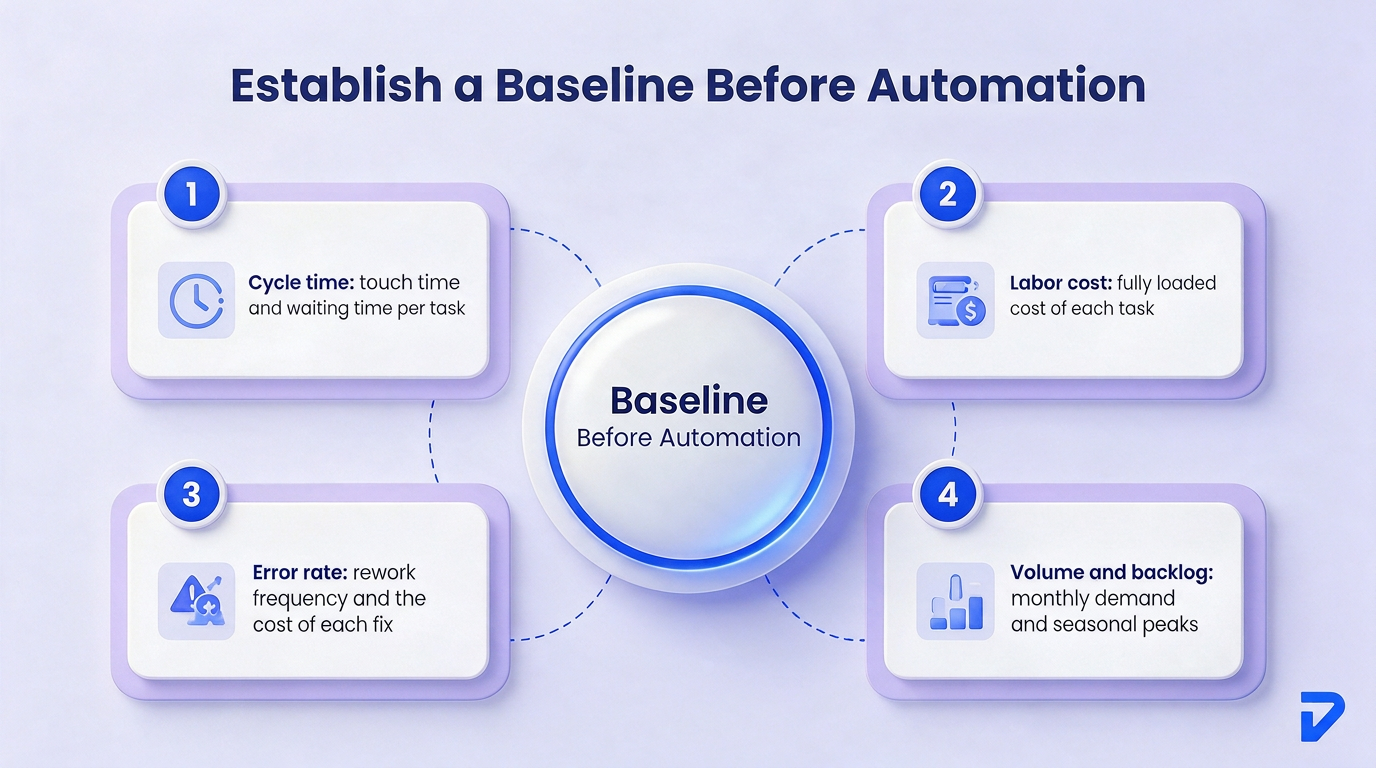
A believable AI automation ROI figure needs a before picture. Capture 30 to 90 days of data on the chosen workflow, pulled from system logs rather than memory. Record these four measures:
- Cycle time per task, from request to completion
- Labor cost per task, using fully loaded hourly rates
- Error and rework rate, including the cost of each fix
- Monthly volume and backlog, so seasonal peaks show up
Distinguish Processing Time From Waiting Time
In a quoting workflow, a request might wait a day for a price check while the actual work takes ten minutes. Automation often removes the waiting more than the work. Only a baseline that separates touch time from waiting time will show where the savings really come from.
Finalize and Approve the Baseline
Freeze the baseline once everyone agrees on it, and ask finance to sign off before the build starts. That signature heads off the later argument over whether last quarter was really that slow. Treat AI process automation like any capital project; no approved starting point, no approved results.
3. Define the Metrics That Determine ROI
AI automation ROI depends on measurable outcomes. Selecting the right KPIs helps businesses track cost savings, productivity gains, process quality, and financial impact.
Choose the Numbers Before You Build
Gartner estimates that 84% of finance leaders have not been able to measure the ROI of AI initiatives, a figure IBM cited in a 2026 product announcement. Teams that agree on what to count before launch avoid much of that difficulty.
Pick Three to Five KPIs
Select KPIs that finance already trusts. Mix efficiency, quality, and speed so one flattering number cannot hide a weak one. Feed them into decision intelligence reporting so leaders see the trend every month, not once a year.
| KPI | What it shows | How to calculate it |
| Cost per transaction | Unit economics | Total workflow cost ÷ transactions |
| Hours saved | Capacity freed | Baseline hours − current hours |
| Error rate | Quality | Errors ÷ transactions |
| Throughput | Speed and scale | Transactions completed per week |
| Realized savings | Cash impact | Costs actually removed or avoided |
Leading and Lagging Indicators
Track both types, because they answer different questions:
- Adoption rate and exception rate are leading indicators and move first
- Cost per transaction and realized savings are lagging indicators and follow weeks later
Together they give early warning, so a stalled rollout shows up in month two instead of month six.
Set Targets and Keep Benefits Separate
Set a target and a review date for every KPI. Realized savings count only when budgets, overtime, or hiring plans actually change. Keep benefits, such as employee satisfaction or faster onboarding, in a separate column. Finance will trust the hard numbers more when the two are not blended.
4. Calculate Total Implementation and Operating Costs
Before estimating returns, businesses need to account for all automation expenses, including integration, data preparation, security, and recurring support.
Why Build Quotes Mislead
Most cost models stop at the build quote. That is where trouble starts. IBM’s research on technical debt found that accounting for it can lift AI returns by 29%. Legacy systems, messy data, and brittle integrations are real costs, and they appear whether or not you budgeted for them.
One-Time Versus Ongoing Costs
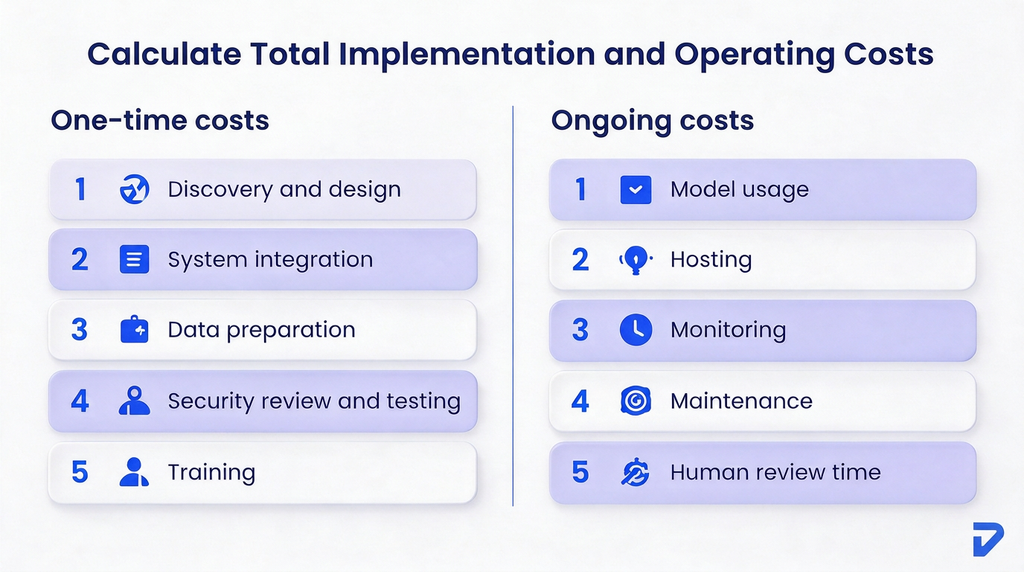
An honest AI automation ROI model separates one-time costs from ongoing ones. One-time costs include:
- Discovery and design
- System integration
- Data preparation
- Security review, testing, and training
Costs that continue after launch include:
- Model usage and hosting
- Maintenance and drift monitoring
- Human review time
- Upkeep ownership
The Two Costs Teams Miss Most
The first is human-in-the-loop review, where a person checks the AI’s output on uncertain cases. The second is drift monitoring, which watches for accuracy slipping as inputs change. Both take staff time every month. Add a contingency line, and name an owner whose time belongs in the recurring column.
Plan for Integration Early
The model has to connect to your ERP, CRM, and document systems, often the largest part of the build. Budget early for integration and governance work, because retrofitting security and audit trails later usually costs more.
5. Estimate Productivity Gains and Financial Benefits
AI automation can deliver financial benefits through labor savings, fewer errors, and increased revenue opportunities. Measuring these gains and comparing conservative, expected, and optimistic scenarios helps businesses build realistic ROI projections.
What the Industry Data Suggests
PwC found that industries most exposed to AI recorded three times the growth in revenue per employee, 27% versus 9%, compared with the least exposed. Treat that as an industry-level association, not proof that automation caused the gap. It does suggest looking past task speed toward revenue capacity.
Three Benefit Buckets
Estimate benefits in three buckets:
- Labor capacity: hours saved multiplied by the loaded hourly rate
- Quality: the cost of errors and rework avoided
- Revenue: added contribution margin from faster quotes, higher conversion, or fewer lost customers
Use margin, never raw revenue. Artificial intelligence automation can raise output without adding headcount, a real advantage when hiring is slow.
Build Three Scenarios
Model all three cases, then fund the decision on the cautious one:
- Conservative: the case that justifies the funding
- Expected: the case used for planning
- Optimistic: treated as upside only
If the project only works under optimistic assumptions, that is useful information. It is far cheaper to learn it before the build.
6. Calculate AI Automation ROI and the Break-Even Point
ROI and payback period reveal whether an AI automation investment delivers sufficient financial returns. These calculations compare total benefits against costs and show how long the project takes to recover its initial investment.
The Two Core Formulas
Two formulas do the work:
- ROI (%) = (total benefits − total costs) ÷ total costs × 100
- Payback (months) = one-time cost ÷ monthly net benefit
Report both, because a project can show a strong ROI and still pay back too slowly for your cash position.
Benchmark Against Real Payback Times
Deloitte’s 2025 survey of 1,854 executives in Europe and the Middle East found that only 6% reported payback in under a year. Most reported satisfactory returns within two to four years, depending on use case and scope. Set your expectations against that range.
A Worked Example
Here is how to calculate automation ROI in practice. Picture a distributor that sends 1,500 quotes a month. Each takes 20 minutes by hand and 6 minutes with AI drafting plus human review. That saves 4,200 hours a year at a $38 loaded rate. The figures are hypothetical, chosen to show the math.
| Line item | Annual figure |
| Labor capacity (4,200 hours × $38) | $159,600 |
| Rework and error savings | $18,000 |
| Added contribution margin | $60,000 |
| Total annual benefit | $237,600 |
| One-time implementation cost | $120,000 |
| Recurring annual cost | $42,000 |
| Year-one ROI | 47% |
| Payback period | 7.4 months |
| Three-year ROI | 190% |
Year-one ROI is 47% because the build cost lands in year one. Monthly net benefit is $16,300 (annual benefit minus recurring cost, divided by 12), so payback takes about 7.4 months. By year three, cumulative ROI reaches 190%.
Stress-Test the Result
A 7.4-month payback is faster than the Deloitte range above, which is a signal to test your inputs. This example assumes a narrow workflow and clean data. Now suppose only 60% of the labor savings materialize because adoption lags:
- Labor capacity falls to $95,760
- Payback stretches to about 10.9 months
- Year-one ROI drops to 7%
The project still works, but the margin for error is thin.
Need to measure the financial value of AI automation?
Pinnasys helps businesses build AI automation solutions that improve efficiency, control costs, and deliver measurable returns.
7. Map the Timeline to Financial Returns
The time required to realize AI automation ROI depends on implementation, employee adoption, and data readiness. Tracking these factors helps businesses understand when savings begin, how benefits grow, and when the investment reaches break-even.
A Benchmark From AI Agents
Salesforce surveyed 2,025 agentic AI decision-makers. Among those already running AI agents in production, meaningful ROI arrived in about eight months on average. Teams that unified their data before launch got there in 7.3 months, versus 8.8 for those that cleaned up data afterward.
The Three Phases of Value
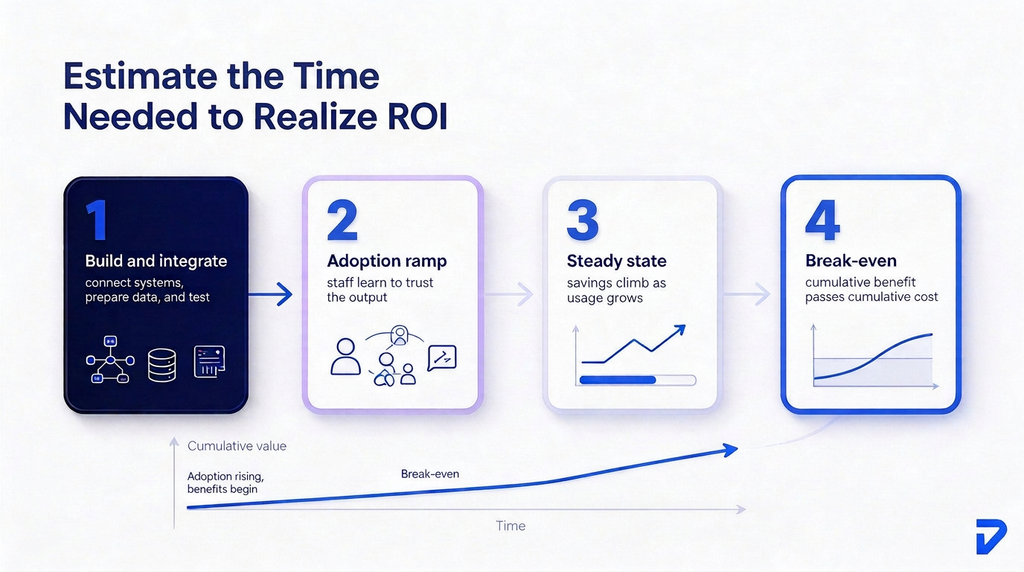
Plan AI automation ROI on a timeline, not a single date. Value usually follows three phases:
- Build and integration: costs land, savings are near zero
- Adoption ramp: staff come to trust the output
- Steady state: savings climb as usage grows
Track the Break-Even Month
Chart cumulative cash flow month by month and mark the break-even point. Update the chart with actuals every month. When forecast and actuals diverge, find out why quickly, because the cause is usually adoption, data quality, or a cost that was left out of the model.
Match the Benchmark to Your Technology
The Salesforce figure covers AI agents, which handle judgment calls. Robotic process automation and AI in business services often run side by side. Robotic process automation (RPA) follows fixed scripted rules, so it carries a different cost and timeline profile. Intelligent process automation blends both, so measure each part separately.
8. Validate Results and Scale Successful Workflows
A successful AI automation pilot must demonstrate measurable business value before expansion. Validating operational performance, financial savings, reliability, and scaling costs helps businesses confirm ROI and identify workflows ready for wider deployment.
Why Pilots Fall Short
A good pilot is not a good business case. BCG found that only 22% of companies had moved past proof of concept to generate some value, and just 4% were creating substantial value. Validation is how you learn which side of that line you are on.
Four Validation Checks
Test every pilot against four checks before expanding:
- Operations: hours, cycle time, and throughput versus the frozen baseline
- Finance: savings visible in budgets, rather than only in dashboards
- Reliability: error rate, exception rate, and uptime over several weeks
- Cost to scale: added integrations, volume-based model fees, and support load
Use a Holdout Group
Where volume allows, run the automated and manual paths side by side for several weeks. A simple holdout group shows what would have happened without automation, which makes the comparison far harder to dispute. Without one, seasonality and staffing changes can quietly flatter the results.
Scale Only After All Four Pass
Workflow orchestration (software that coordinates steps across systems, models, and people) keeps new workflows consistent. For unusual logic that off-the-shelf tools cannot handle, custom AI development may justify the extra build cost.
9. Avoid Common AI Automation ROI Mistakes
Accurate AI automation ROI depends on avoiding common measurement and implementation mistakes. Overlooked costs, unverified savings, and inefficient workflows can distort results, making it essential to validate benefits and redesign processes before automating them.
What the Data Shows
Gains on individual tasks do not automatically become company-wide profit. McKinsey’s 2025 survey found that just 39% of respondents attribute any EBIT impact to AI across the whole company, although many report benefits within individual use cases. Most of those 39% say AI accounts for less than 5% of EBIT.
Five Mistakes Behind Most of the Gap
Watch for these patterns:
- A missing baseline, which leaves every later claim open to challenge
- Saved hours booked as cash when no budget actually changed
- Run costs left out, such as monitoring, model fees, and review time
- A pilot judged by its best week instead of a typical month
- A broken process automated when redesigning it first would pay more
The Attribution Trap
When sales rise after launch, the automation is one of several possible causes. Agree with finance on a conservative attribution share, or use a control group, so the benefit you claim is the benefit you can defend.
Redesign Before You Automate
McKinsey also found that high performers were nearly three times as likely as others to have fundamentally redesigned individual workflows. Process redesign first often beats automating around the problem.
10. Build a Repeatable AI Automation ROI Measurement Framework
A consistent AI automation ROI framework helps businesses measure returns, compare workflows, and track results over time. Standardized metrics and regular reviews support better investment decisions and long-term accountability.
Create a One-Page Scorecard
One good calculation is a project. A repeatable method is a capability. Turn the nine steps into a one-page scorecard that every new workflow completes before funding. A written automation ROI methodology lets leaders compare a quoting project with a claims project on equal terms. The scorecard needs seven fields:
- Business owner
- Frozen baseline
- KPI targets
- Cost ledger
- Benefit model
- ROI with payback
- Review date
Rank, Re-Forecast, and Review
Rank all workflows by payback and ROI together. Re-forecast quarterly, and redesign or retire any workflow that misses its targets twice. Assign two owners: one from finance and one from operations. Finance protects the arithmetic, and operations protects the context. Review monthly through the first two quarters.
The Bottom Line
Reliable AI automation ROI comes from discipline, not optimism. Set the baseline first, count every cost, separate cash savings from capacity, and report payback next to percentage return. Prove one workflow thoroughly, then repeat the same process for the next one. Numbers that survive finance review earn the next round of funding.
Many mid-market teams need a clearer way to decide where to spend and how to prove it worked. If you want a second set of eyes on your first calculation, Pinnasys is ready to help.
A short conversation about AI consulting and roadmap planning is often enough to choose the right workflow, agree on the baseline, and set a payback target you can defend.
Key Takeaways from the Article
- Workflows chosen for business value return more than workflows chosen for convenience.
- A finance-approved baseline is the only defensible starting point for any ROI claim.
- Saved hours become savings only when time is redeployed or hiring is avoided.
- Payback and percentage ROI answer different questions, so report both together.
- Pilot success means little until results reconcile with the baseline and scaling costs.
Frequently Asked Questions About AI Automation ROI
How do I approach AI automation ROI if I have never measured it before?
Start with one workflow and a finance-approved baseline. Google Cloud reports that 84% of organizations moved a generative AI use case into production within six months, so one scoped project is realistic. Expand AI for automation only after results reconcile.
What is the best way to implement AI automation ROI tracking?
Use one scorecard per workflow and track adoption alongside savings. Salesforce found a 53% employee adoption rate among organizations running AI agents in production, so usage cannot be assumed. Business process automation pays only when people actually use it.
How does measuring RPA differ from measuring AI process automation?
RPA follows fixed scripts, so benefits are easier to forecast. AI process automation handles variable inputs, so track accuracy and exception rates too. McKinsey found 88% of organizations use AI in at least one function, yet most remain in pilots.
What mistakes should I avoid with AI automation ROI?
A skipped baseline and unrealized hours counted as savings cause the most damage. BCG found that 74% of companies have yet to show tangible value from AI, so rigorous measurement matters from day one of any automation and AI program.
How long does AI automation ROI take to implement?
Longer than most budgets assume. Deloitte notes typical technology payback is seven to 12 months, yet only 13% of even the most successful AI projects returned value within 12 months. Narrow scope shortens AI and automation timelines.