AI chatbot development blends NLP, machine learning models, and backend integration to build assistants that understand intent and act on it. The real difference between a working chatbot and a failed one comes down to architecture, training, and how cleanly the bot connects to your existing systems.
From e-commerce to healthcare, most innovative businesses now treat conversational AI as a line item, not a question. The harder part is figuring out what to actually buy. A demo looks great in a sales call. The same bot fails the moment it hits real customer queries, broken integrations, or messy backend data.
Here’s the thing. Hiring an AI expert without understanding the moving parts almost guarantees a stalled project. AI chatbot development is part architecture, part training data, and part change management. Before you sign a contract, you need to know what good looks like, where the build can break, and which questions to ask. This guide covers all of it.
What is an AI Chatbot?
An AI chatbot is a software system that holds natural conversations with users using natural language processing (NLP), machine learning, and large language models (LLMs). Unlike rule-based bots, it interprets intent, manages context across turns, and pulls answers from connected systems. Modern enterprise chatbots also use retrieval-augmented generation (RAG) to ground responses in your real business data.
Why Does it Matter for Your Business?
Customer expectations have shifted. People want answers in seconds, not tickets in queues. AI chatbots make that possible at a cost structure that traditional support cannot match. According to IBM research, businesses using AI chatbots can cut customer service costs by up to 30% while resolving the majority of tier-one queries without human involvement.
Here is what conversational AI gives a business:
- 24/7 customer coverage without staffing every shift
- Lower cost per resolution compared to human-only support
- Faster ticket triage and routing for complex cases
- Higher lead qualification accuracy on websites
- Multilingual support without proportional headcount
- Real-time data capture for sales and product teams
- Consistent answers across every customer touchpoint
- Reduced agent burnout on repetitive queries
Core Components of AI Chatbot Development
Natural Language Processing (NLP)
NLP is the layer that turns raw user input into structured meaning. It handles tokenization, parts-of-speech tagging, syntactic parsing, and semantic understanding. Modern NLP chatbots use transformer-based models like BERT, GPT, or domain-tuned LLMs. The quality of NLP directly decides whether the bot understands “I want to cancel” and “please close my account” as the same request.
Machine Learning Models
Machine learning models give the bot its ability to improve over time. As expected, they learn from past conversations, flagged errors, and human corrections. Most enterprise chatbots use a mix of supervised learning for intent classification and reinforcement learning from human feedback for response ranking. Fine-tuning on your domain data is what separates a generic GPT wrapper from a usable enterprise chatbot.
Intent and Entity Recognition
Intent recognition identifies what the user wants to do. Entity recognition extracts the specific values from that request. For instance, in “Book a flight to Denver on Friday”, the intent is “book_flight,” and the entities are “Denver” and “Friday”. Accurate intent and entity recognition is the single biggest factor behind real-world chatbot accuracy.
Integration Layer
The integration layer connects the chatbot to your CRM, ERP, ticketing tool, payment gateway, and internal databases. Without it, the bot can talk but cannot do anything useful. Most enterprise chatbots integrate via REST APIs, webhooks, or platform connectors like Salesforce, Zendesk, HubSpot, and ServiceNow. Besides, this layer also handles authentication and rate limits.
Analytics Dashboard
The analytics dashboard tracks how the bot is actually performing in production. It surfaces fallback rates, intent accuracy, drop-off points, conversation length, and CSAT scores. Not only does it improve machine learning, but it also helps you measure the KPIs. Tracking weekly KPIs is what separates chatbots that improve over time from those that quietly degrade after launch.
What Does an AI Chatbot Development Process Look Like?
Step 1: AI Consultation and Requirement Analysis
This is the discovery phase. A good AI consultation partner maps your current support volume, top intents, customer channels, and integration needs. The output is a clear scope: which use cases the bot will handle, which it will escalate, and which KPIs will define success. According to Gartner, conversational AI deployments are projected to reduce contact center agent labor costs by $80 billion by 2026, but only for teams that scope use cases correctly upfront.
Step 2: Conversation Flow Design
Conversation designers map every realistic user path. They define dialogue flows, fallback paths, escalation triggers, and tone of voice. Tools like Voiceflow, Botmock, and Figma are common here. The goal is a flow that handles happy paths, edge cases, and frustrated users without breaking. Bad flow design shows up later as high abandonment and angry escalations to live agents.
Step 3: Model Training
Training combines pre-trained LLMs with your business data. Engineers prepare datasets, label intents and entities, and fine-tune the model. RAG pipelines are added so the bot can pull real-time answers from your knowledge base. A typical training command looks like this:
python train.py --model gpt-base --data ./intents.json --epochs 5Evaluation metrics include intent accuracy, F1 score, and grounding precision. Anything below 85% intent accuracy is not production-ready.
Step 4: Backend Integration
Engineers wire the bot into your real systems. That means CRM lookups, order status APIs, payment workflows, and authentication services. Webhooks, OAuth, and middleware platforms like MuleSoft or Workato come into play. Security reviews happen here, too. PII handling, in-transit encryption, and role-based access controls are non-negotiable for any enterprise chatbot in the US market.
Step 5: Testing Phase
Testing covers four layers:
- Unit testing for individual intents and flows
- Integration testing for backend connections
- User acceptance testing (UAT) with real internal teams
- Adversarial testing for prompt injection, jailbreaks, and edge cases
A chatbot that passes UAT but fails adversarial testing is not ready for public deployment. Enterprise teams should also run red-team exercises before launch.
Step 6: Deployment and Monitoring
The bot ships to production behind feature flags or canary releases. Real traffic surfaces issues that no test suite catches. Monitoring tools like Datadog, LangSmith, and in-house dashboards track latency, fallback rates, hallucinations, and user satisfaction. Continuous improvement loops, where flagged conversations are reviewed and fed back into training, keep the bot accurate over time.
Planning your AI chatbot project?
Pinnasys handles the full six-step build, from discovery and conversation design to post-launch monitoring. Talk to our AI architects and get a clear scope, timeline, and cost estimate for your use case.
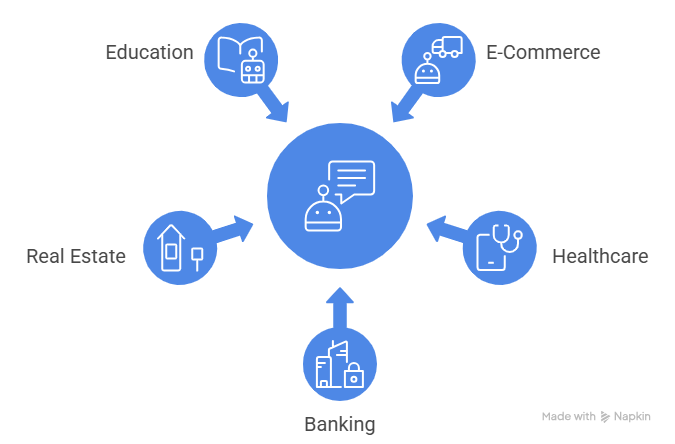
Industry-Wise Applications of Intelligent Virtual Assistants
E-Commerce
Retailers like Walmart, Target, and Sephora lean on AI chatbots to guide shoppers from product discovery to checkout. The bot recommends items based on browsing behavior, recovers abandoned carts, tracks orders, and processes returns through Shopify or custom commerce stacks. For high-traffic brands, the same assistant qualifies leads on landing pages and feeds enriched data straight into the marketing CRM.
Healthcare
In US healthcare, chatbots take on the work that drains clinical staff: appointment scheduling, prescription refill requests, insurance verification, and symptom triage. HIPAA compliance is the deciding factor in vendor choice, so most provider networks build on HITRUST-certified infrastructure. Beyond admin work, hospitals deploy bots for automated visit reminders, which cut no-show rates and free nurses for higher-value patient interactions.
Banking and Financial Services
Major US banks rely on conversational AI for balance checks, transaction disputes, fraud alerts, and KYC onboarding. Bank of America’s Erica is the benchmark here, having handled over 2.5 billion customer interactions since launch. What makes financial chatbots different is the compliance overhead. Every conversation needs strong identity verification, full audit logs, and real-time fraud monitoring baked into the architecture.
Real Estate
Speed wins deals in real estate, and chatbots solve the response-time problem at scale. Platforms like Zillow and Redfin deploy them to qualify buyer leads, answer listing questions around the clock, and book property tours straight into agent calendars. Behind the scenes, the bot pulls live data from MLS feeds and syncs with HubSpot or Salesforce, so no lead falls through the cracks.
Education
US universities and K-12 districts use chatbots to manage the chaos of admissions cycles, course registration, financial aid queries, and tuition deadlines. Beyond enrollment, modern deployments include adaptive learning assistants that explain concepts, quiz students, and flag struggling learners to teachers. Online learning platforms like Coursera and Khan Academy have made AI tutors core to the product, not a side feature.
Technology Stack Used in Conversational AI Implementation
Frontend Technologies
- React, Next.js, Vue.js
- React Native, Flutter for mobile
- WebSockets for real-time chat
- Tailwind CSS for UI components
- Voice SDKs (Twilio, Vonage)
Backend Technologies
- Node.js, Python (FastAPI, Django), Go
- Express.js, NestJS for API layers
- Kubernetes and Docker for orchestration
- Redis and Kafka for message queues
- AWS Lambda or Google Cloud Functions for serverless workflows
AI and NLP Tools
- OpenAI GPT, Anthropic Claude, Google Gemini
- Rasa, Dialogflow CX, Microsoft Bot Framework, Amazon Lex
- LangChain, LlamaIndex for RAG pipelines
- Hugging Face Transformers
- spaCy, NLTK for classical NLP tasks
Databases
- PostgreSQL, MySQL for structured data
- MongoDB for conversation logs
- Pinecone, Weaviate, and Qdrant for vector search
- Redis for session memory
- Elasticsearch for enterprise search
AI Chatbots vs Traditional Customer Support
| Aspect | Traditional Customer Support | AI Chatbots |
| Availability and coverage | Tied to business hours and shift staffing | Always on across web, app, voice, and messaging |
| Cost per resolution | Scales linearly with headcount and tenure | Near-flat marginal cost once trained and deployed |
| Response and resolution time | Minutes to hours, longer during peak load | Sub-second for tier-one, seconds for RAG queries |
| Scalability under spikes | Requires forecasting, hiring, and training cycles | Elastic, handles 10x volume without new agents |
| Data capture and analytics | Manual notes, often incomplete or lost | Structured logs, intent tags, and CSAT auto-tracked |
| Personalization | Limited by agent memory and CRM lookup time | Driven by user history, preferences, and live context |
The Hybrid Model – NLP Chatbots Plus Human Support
The smartest enterprise deployments do not choose between AI and human agents. They build a hybrid system where the bot handles tier-one volume and routes anything ambiguous, emotional, or high-stakes to a human with a full conversation history attached.
The model works because it splits the workload by strength. The bot solves around 70 to 80% of routine queries instantly. Agents focus on complex cases where judgment matters. Every escalation also feeds back into training, which compounds accuracy over time.
The handoff design is what makes or breaks the hybrid model. The bot must know its limits, escalate cleanly, pass full context, and never trap the user in a loop. Build escalation triggers around fallback rate, sentiment score, and explicit user requests for a human.
The Bottom Line
AI chatbot development is no longer a side project. It is core infrastructure for any business serious about customer experience and operational efficiency. The teams that win treat chatbots as production systems, not demos. That means strong NLP, solid integration, hybrid escalation, and continuous monitoring.
Pinnasys builds exactly that. Our team designs and runs AI chatbots that go live and stay live, with measurable impact on resolution rates, cost, and CSAT. If you are mapping out your next chatbot project, explore our conversational AI solutions and book a discovery call with our AI architects.
Key Takeaways from the Article
- AI chatbots combine NLP, ML, and integration layers for production use
- Five core components determine chatbot accuracy and reliability in production
- A six-step process turns chatbot ideas into live, monitored systems
- Hybrid AI plus human support beats either approach on its own
- The right tech stack depends on scale, compliance, and integrations
Frequently Asked Questions
What is Conversational AI?
Conversational AI is the broader field that covers chatbots, voice assistants, and any system that holds natural dialogue with users. It uses NLP, machine learning, and dialogue management to understand intent, manage context, and respond in human-like language across channels.
How to Choose the Right Chatbot Development Partner?
Look for proven production deployments, not just demos. Ask about NLP accuracy benchmarks, integration depth, security certifications, and post-launch monitoring. The best AI chatbots for customer service come from partners who treat chatbots as long-term systems, not one-time projects.
How Much Does a Chatbot System Development Cost?
Costs range from $15,000 for a scoped MVP to $250,000 plus for full enterprise chatbots with multi-system integration. Pricing depends on the intents covered, custom model training, integration complexity, compliance needs, and ongoing monitoring or governance.
What is the Role of AI Chatbot Development in Multi-Channel Support?
AI chatbot development unifies support across web, app, SMS, email, and voice. A single trained model serves every channel with a consistent tone and context. This reduces integration costs and gives customers the same answer no matter where they reach out.
Leave a Reply